
This is a guide for automating the integration of Quandis Military Search (QMS) using the Quandis Data Services Platform. It describes transmission protocols utilized, the QMS Military workflow, XML messaging and schema requirements. It will also outline general usage and common error types.
It is written for both prospective and new system integrators, consultants and other technical professionals interested in integrating with QMS.
The following terms are referred to in this document.
| Term | Definition |
| Client, Clients | Organizations requesting military search orders |
| Endpoint | Web service or HTTP receiver that is exposed by an organization to receive inbound data |
| QBO | Acronym for Quandis Business Objects. Generally refers to any module or component that has been created by Quandis. |
QMS sends and receives data via the public internet using HTTPS (2048 bit) protocol as the standard protocol. VPN connectivity is supported under special circumstances. QMS supports the following protocols:
Preferred Transmission Patterns
QMS supports an event driven transmission model whereas the preference is for the originating system to push or invoke the target end point whenever there is a need to transmit data. This is opposite from the source system polling the target system endpoint to check if data is available at any given time. As a result, we require our partners to expose an end point such as a SOAP web service or HTTPS receiver. The end point is generally public accessible with security controlled by IP restriction and BASIC authentication.
Service Connectors
QMS supports the above protocols as standard connectivity. In some scenarios, there is a requirement to connect to an existing web service or platform using a combination of protocols to satisfy non-standard connectivity requirements for a partner. QMS can also implement Service Connectors that will facilitate this. The usage of Service Connectors is evaluated on a per implementation basis.
Additional Security Models
The following table describes the various protocols and security models used by QMS:
| Protocol | Security Model | Notes |
| HTTPS (ApiKey) | Include a custom HTTP header “X-ApiKey” containing your API access key. | Primary security model used by QMS API integrations. |
| HTTPS (SOAP,REST) | BASIC Authentication using HTTPS. | |
| sFTP | No additional security |
FTP Exchange Model
The FTP file exchange model uses secure FTP to exchange data. Due to the nature of the FTP file exchange, integrations are addressed on an individual basis. Please refer to FTP Exchange Models for common implementations.
The following table outlines the location of UAT and Production host values. Unless otherwise stated, all URL relative paths are the same for production with only the host value changed.
| QMS Environment | Host | Notes |
| UAT | https://uatscra.quandis.net/ | All references in user guide point to UAT |
| Production | https://scra.quandis.com/ |
During the lifecycle of a military search several events occur on the client and Quandis systems. A subset of these events requires communication of data between the various systems to facilitate order processing.
SCRA Request via API
The following endpoints are exposed by QMS for military search events:
| Event | Endpoint | Description |
| Request SCRA Search | https://uatscra.quandis.net/Military/Military.ashx/Search | HTTP POST with XML payload. See QMS Data Dictionary for request format and data points. |
| Pickup SCRA Results | https://uatscra.quandis.net/Military/Military.ashx/Pop | Pop results via HTTP GET to retrieve SCRA results. |

Order Pickup
QMS exposes a stand-alone endpoint which allows clients to poll for completed orders. Product data is retrieved by invoking the endpoint. Upon invoking the pickup endpoint, each complete order is represented as a message in the pickup response and marked as received. Once the pickup list includes a given order, it is automatically removed from the list and will no longer be present in subsequent calls. Users have the option to embed product data in the pickup response or obtain a Resource Urn to access the product data at a later time.
Product Pickup
The pickup endpoint accepts the following optional parameters:
| Parameter | Description |
| MessageCount | Allows for multiple messages to be downloaded at once. Allowed values: 1-5. Default value is 1 which implies one message will be returned when the pickup endpoint is invoked. |
| PayloadType | Embeds product content or product pointer in pickup message. Enumerated: Content, ResourceUrn. Default is Content. See below for best practices. |
Best Practices
The frequency is which to invoke the pickup method should be set by a schedule in accordance with given SLA requirements. Since the pickup method is a polling method, it will return a message list with a count ranging from zero to the number of available messages. The following table is suggests best practices for invoking the pickup endpoint:
| Message Count Returned | Frequency |
| 0 | If no messages are available, use the next run date on the predefined schedule performing the polling. |
| Greater than 0 | If messages are available, invoke the pickup method as soon as the previous call completes and repeat until no messages are available to ensure all messages are retrieved. |
The pickup model response allows for embedding of product data as a convenience or emitting a ResourceUrn which allows product to be accessed in a subsequent call. PayloadType usage guidelines are:
| Payload Type | Recommended Usage |
| Content (Embedded Product) | Smaller payloads, smaller volume and when content is NOT processed during the pickup call. We recommend saving a copy of the content and processing at a later time. |
| ResourceUrn (Product Pointer) | Larger payloads (due to multiple searches), larger volume with ability to use separate process to invoke the Product endpoint to download and process product a separate process. Also note the product can be obtained subsequent times by accessing ResourceUrn without invoking pickup method. |
Practical Example: We suggest not to set MesageCount to 5 with PayloadType to Content and process data (saving file content, saving data to DBMS) during the pickup call in favor of MessageCount to 5 with PayloadType to ResourceUrn with separate calls to the product resource.
Client Notification / Product Pickup
QMS has the ability to notify the client product is ready for consumption and the client must invoke the product endpoint to obtain product data. Upon order completion, QMS will invoke the client endpoint submitting a Product Notification. The Product Notification contains a ResourceUrn binding to the product endpoint for subsequent product download. The client reserves the right to download the resource on their schedule. The ResourceUrn contains a reference to the Product endpoint and will return the Product Data format. This is the preferred approach for processing orders that contain multiple searches.

Callback Support
QMS can also be configured to post SCRA results to a specific endpoint as results become available. This substitutes the Pickup/Pop step but requires client-side security permissions and endpoint maintenance.
Batch Search via QMS Web Portal
QMS supports batch and ad-hoc file drops for larger search populations. Primary file submission practice is to submit ad-hoc via the QMS Web Portal.

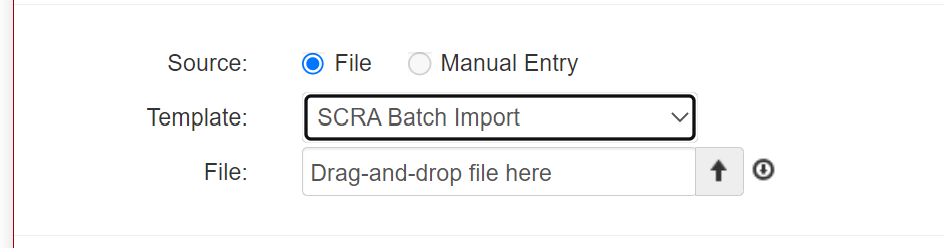
Batch Search via FTP File Exchange
File watchers can be configured to monitor an FTP location for pickup and processing of batch files. See FTP Exchange Models listed below.
Accepted file types include Excel and fixed-width text. See QMS Data Dictionary for templates.
QMS has the concept of monitoring via Buckets. This allows users to manage and schedule the monitoring of a population of borrowers for possible status and datapoint changes.
Monitored datapoints:
Managing Bucket Population via API
Monitoring requests support RESTful patterns to manage a Bucket population:
| Event | Endpoint |
| Add Borrower to Existing Bucket | https://uatscra.quandis.net/Military/{Bucket}/AddContact/{LastName},{FirstName},{USSSN}, etc |
Monitoring via QMS Web Portal
Bucket populations can also be managed via the QMS Web Portal. See QMS Data Dictionary for standard request and response formats.
Monitoring via FTP File Exchange
File watchers can also be configured to monitor an FTP location for pickup and processing of bucket files. See FTP File Exchange Models below.
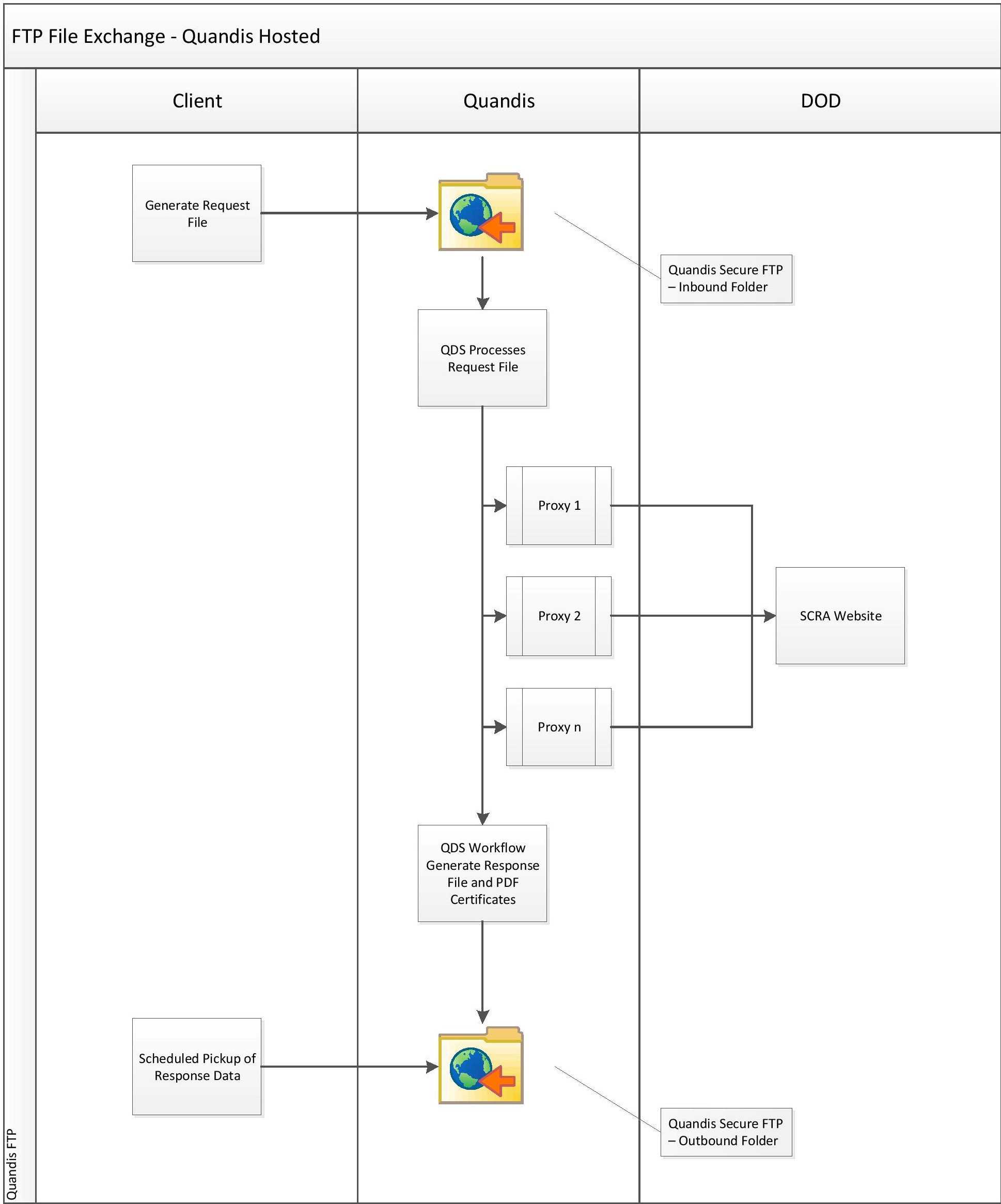
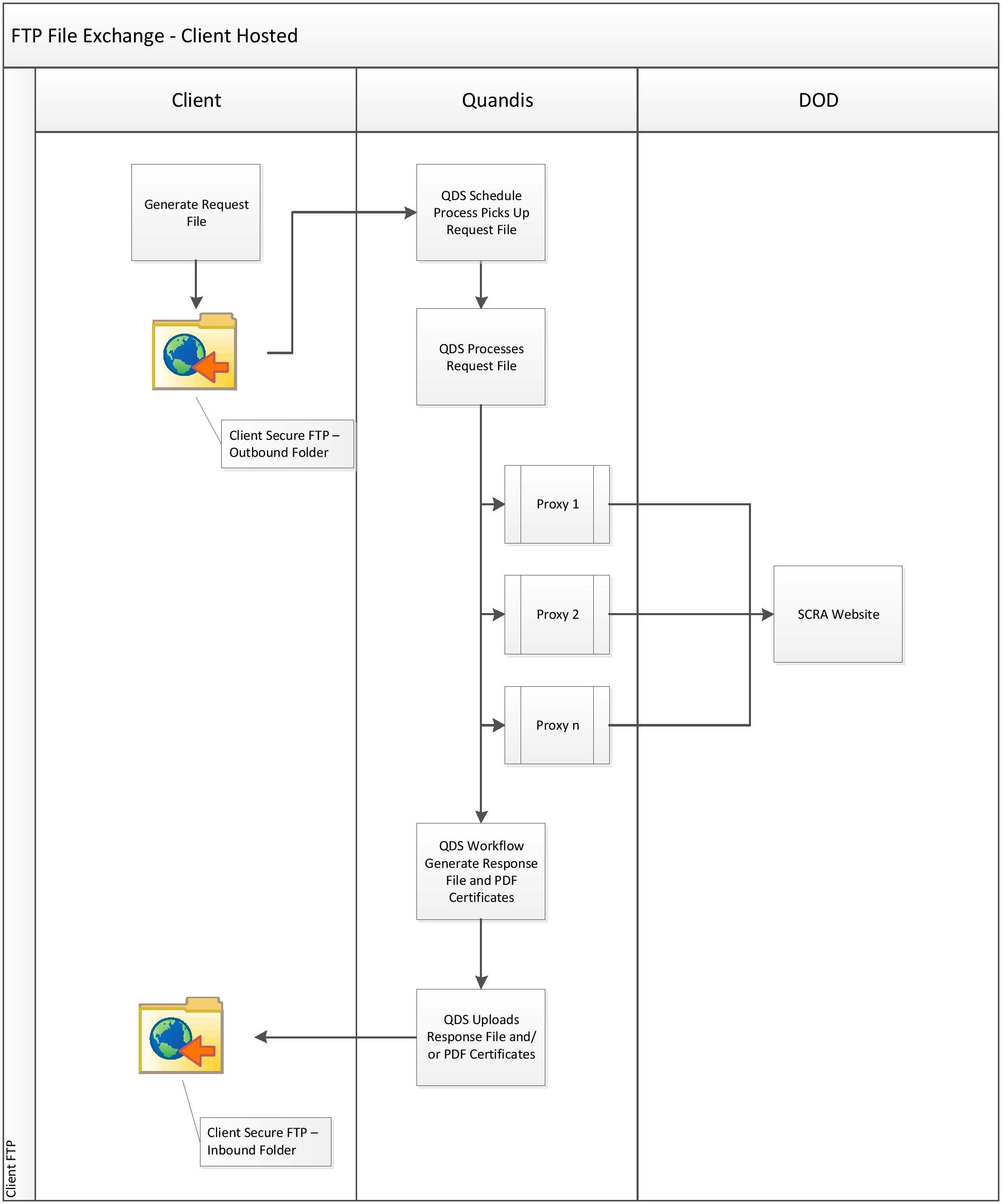
Military search data can also be exchanged using secure FTP. In most cases, each implementation is slightly different. The following examples are the most common integration scenarios.
Quandis-Hosted FTP Model
The following model outlines the FTP file exchange process where Quandis hosts the FTP server.
Client-Hosted FTP Model
The following model outlines the FTP file exchange process where the client hosts the FTP server.
QMS currently supports two permutation models: Simple and Advanced. With each model, subject data is parsed and prepared before permutation logic is applied. Visit our Parse and Permutation Guide for an in-depth explanation of our parse and permutation features.
Image Packages allow clients to define multiple package profiles of order options with the granularity to meet compliance requirements. This eliminates FTE and automates compliance requirements. See our Image Packages Guide for more information.
The QMS API offers the ability to access file content. This is useful for on-demand access of images when clients choose to control which files or images to manage. The following file types are available for download using the API:
GET api/v1/file/{id}
| Response Format | JSON, Xml |
| Authentication Required | Yes |
| Rate Limited | No |
| X-ApiKey | {Provided by Quandis} |
| Parameter | Description | Required | Example |
| id | Quandis unique file identifier | Required | 1 |
| Status | HTTP Status Code |
| Complete | 200 |
| Error | 500 |
| Content-disposition | attachment; filename=”{File Name}” |
| Content-Length | File Length |
{Image Content}