
This document serves as a data dictionary for QMS API 1.0.0 formats.
It is written for both prospective and new system integrators, consultants and other technical professionals interested in integrating with QMS.
Definitions
The following terms are referred to in this document.
| Term | Definition |
| Client, Clients | Organizations requesting military search orders |
| Endpoint | Web service or HTTP receiver that is exposed by an organization to receive inbound data |
| QBO | Acronym for Quandis Business Objects. Generally refers to any module or component that has been created by Quandis. |
The following endpoints are exposed by QMS for military search events:
| Purpose | QMS Endpoint |
| Order Placement | https://uatscra.quandis.net/Military/Military.ashx/Search |
| Order Pickup (Polling) | https://uatscra.quandis.net/Military/Military.ashx/Pop |
| Order Request Validation | https://uatscra.quandis.net/Military/Military.ashx/Validate |
Field Legend
| Field | Description |
| Data Element | Name descriptor of field |
| Type | Enumerated. See Field Type |
| Size | Field length |
| Req | Enumerated. See Required Type |
| Notes | Description of field |
Field Types
| Type | Description |
| AN | Alpha Numeric |
| A | Alpha |
| N | Numeric |
| D | Date. All dates follow format YYYY-MM-DD |
| B | Boolean |
| E | Enumerated. See corresponding enumeration |
| Node | Node |
| Attribute | Attribute |
Required Types
| Type | Description |
| Y | Always required |
| N | Always optional |
| CO | Conditionally optional |
API Request Format
Standard API search requests are composed as HTTP POST requests with an XML payload.
| Description | |
| Endpoint | https://uatscra.quandis.net/Military/Military.ashx/Search |
| Header | X-ApiKey QMS-Generated GUID |
| Payload | XML SCRARequest payload. See below for format. |
Sample API Request
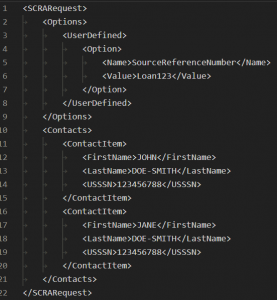
API Request Options
All order options can be configured to a default setting from the QMS Web Portal. This allows requests to be more succinct by only including options you wish to override from your default preference. Omitted API options from the request XML will default to the profile setting. For a list of all permutation options and use-cases, see: Permutation Features
| Data Elements | Type | Size | Req | Notes |
| SCRARequest | Node | Y | Container for order request | |
| Options | Node | Y | Root node for order options | |
| NamePermutate | AN | N | Used to set permutation model. See Name Permutate | |
| ValidatePermutationCount | B | N | Permutation option. Enables permutation restrictions per contact. | |
| MaxPermutationCount | N | N | Permutation option. The number of permutations permitted per contact. | |
| Transpose | B | N | Permutation option. Will transpose multipart names | |
| MixedCaseSplit | B | N | Permutation option. Will detect and split up mixed case names for additional permutations. | |
| ForceHyphen | B | N | Adds Hyphens as name separators when generating permutations | |
| ToggleMiddleName | B | N | Includes permutations with and without middle name when generating permutations and middle name provided | |
| MiddleNameParse | E | N | Permutation option. Will apply middle name and/or initial to alias or permutated names. | |
| ForceHypen | B | N | Permutation option. Will inject a hyphen in split names as additional permutations. | |
| ProductType | AN | N | Product format. See Product Type | |
| ProductDelivery | AN | N | Product delivery method. See Product Delivery | |
| UserDefined | Node | N | Parent node for user defined options | |
| Option | Node | Y | Parent node for user defined key value pair | |
| Name | AN | 50 | Y | User defined option name |
| Value | AN | 255 | Y | User defined option value |
| Contacts | Node | Y | Parent node for contacts being searched | |
| ContactItem | Node | Y | Root node for Contact | |
| ContactID | AN | 255 | N | Unique value for borrower from originating system |
| ContactType | E | N | Enumerated. See Contact Type | |
| FirstName | AN | 255 | CO | First name of contact |
| MiddleName | AN | 50 | CO | Middle name of contact |
| LastName | A | 255 | Y | LastName of contact |
| USSSN | N | 9 | O | Social Security Number. Value can be 4 or 9 digits. |
| BirthDate | D | O | Birth date of party. Used as alternate to USSSN. If USSSN is provided omit BirthDate. | |
| DateofInterest | D* | N | Active Duty Status Date. If omitted, default will be today’s date. DateTimeOffset and Zulu time are also acceptable. | |
| Address | AN | 100 | CO | Address of contact |
| City | AN | 100 | CO | City of contact |
| State | E | 2 | CO | Enumerated: State of contact represented by two digit state code. |
| PostalCode | AN | 10 | CO | PostalCode of party |
| UserDefined | Node | N | Parent node for user defined options of contact | |
| Option | Node | Y | Parent node for user defined key value pair | |
| Name | AN | 50 | Y | User defined option name |
| Value | AN | 255 | Y | User defined option value |
Special UserDefined Options
| Data Elements | Type | Size | Req | Notes |
| SourceReferenceNumber | AN | Y | Case Key or Equivalent Identifier | |
| ExternalReference | AN | N | System Identifier | |
| APIImagePackage | AN | N | Custom Image Package Identifier | |
| PermutationPackage | AN | N | Custom Permutation Package Identifier |
Order Request Acknowledgement
| Data Elements | Type | Size | Req | Notes |
| ImportCollection | Node | Y | Parent container of acknowledgement | |
| ImportFileID | Attribute, N | N | Quandis unique order identifier | |
| Status | Attribute, E | Y | Order processing status. Enumerations: Error, Pre Validation, Validation Error | |
| Success | E | Y | Used to indicate order has been successfully received. Enumerated: True, False | |
| Exceptions | Node | N | Parent container for order processing exceptions. Exceptions are present during processing errors | |
| Exception | Node | Y | Parent container for individual order exceptions | |
| Type | AN | 255 | Y | Exception type |
| Severity | AN | E | Y | Exception severity. Enumerations: Error, Warning |
| Message | AN | T | Y | Exception message |
Pickup Response
| Data Elements | Type | Size | Req | Notes |
| Messages | Node | Y | Parent container | |
| AvailableCount | Attribute | Y | Count of available messages | |
| Exception | AN | CO | Optional tag rendering errors encountered. Tag is only rendered in the case of an error | |
| Message | Node | CO | Rendered when a message is available | |
| ID | Attribute | Y | Unique identifier for message represented as a GUID | |
| Exception | AN | CO | Optional tag rendering errors encountered during messages construction. Tag is only rendered in the event of an error. | |
| SCRAResponse | Node | Y | Parent container of product data. See Product Data definition |
Product Notification
The Product Notification is used in the product notification/pickup model.
| Data Elements | Type | Size | Req | Notes |
| Pickups | Node | Y | Parent container for Pickups | |
| Pickup | Node | Y | Parent node for individual pickup | |
| ReadyDate | Date | Y | Date resource available for pickup | |
| ResourceUrn | AN | N | URN for resource. Urn can be accessed using HTTP GET |
Product Type
| Enumeration | Description |
| API 1.0.0 | Standard API Format |
| Standard | Standard MS Excel Format |
| Custom | Custom product format |
Product Delivery
| Enumeration | Description |
| Deliver | Submit product data to endpoint |
| Pickup | Enable product for client pickup. No pickup notification will be sent and polling model must be utilized |
| NotificationPickup | Notification is transmitted to client endpoint containing product resource for pickup. Client must invoke product method and to download product |
| Custom | Custom delivery method. Utilized for specialized connectors |
Name Permutate
| Enumeration | Description |
| ParsePermutate | Parses contact with name parsing model and will generate applicable permutations based on permutation options. |
Screenshot Mask
| Enumeration | Description |
| ***** | Mask the first five digits of the USSSN on the SCRA submission screenshot with ‘*****’ |
| None | Do not mask the SSN on the SCRA submission screenshot. |
MiddleNameParse
| Enumeration | Description |
| None | Option turned off. |
| Share | Insert new contact for every unique middle name. Always use the original alias middle name (even if initial). Shares all middle names across all original aliases and primary. |
| ShareMerge | Share middle name across contacts. Merge middle names where full middle name takes priority over middle initial. |
| AppendMiddleInitial | Inserts new contact with middle initial when middle name is provided. |
| AppendMiddleInitialAll | Inserts new contact with middle initial on ALL permutations/aliases when middle name is provided. |
Contact Type
| Enumeration | Description |
| 1 | Primary Borrower |
| 2 | Secondary Borrower |
| 3 | Tertiary Borrower |
| 4 | Borrower position 4 |
| 5 | Borrower position 5 |
| 6 | Borrower position 6 |
| 7 | Borrower position 7 |
| 8 | Borrower position 8 |
| 9 | Borrower position 9 |
Contact Template
| Enumeration | Description |
| Original | Contact submitted with order |
| Alias | Alias generated by order |
| Parsed Original | Contact submitted with order that was parsed and generated aliases |
| Parsed Alias | Alias generated from parsing original contact |
| Permutation | Name variation generated by permutation engine |
| Skiptrace Alias | Alias generated from performing skiptrace |
| Skiptrace Original | Contact skiptrace was performed on |
Active Duty Branch
| Enumeration |
| Army National Guard |
| Army Active Duty |
| Army Temporary |
| Army Reserve |
| Army Unknown |
| Army |
| Coast Guard Active Duty |
| Coast Guard Reserve |
| Coast Guard |
| National Guard |
| Air Force Active Duty |
| Air Force Temporary |
| Air Force Reserve |
| Air Force |
| Public Health |
| Marine Corps Active Duty |
| Marine Corps Temporary |
| Marine Corps Reserve |
| Marine Corps Unknown |
| Marine Corps |
| Navy Active Duty |
| Navy Temporary |
| Navy Reserve |
| Navy Unknown |
| Navy |
| Oceanic And Atmospheric |
SCRA Status
| Enumeration | Description |
| Active Duty | Subject is currently active |
| Discharged | Subject is located and contains a discharge date |
| Not Found | Subject could not be found based on criteria. This is considered a no-hit. |
| Unable To Process | Subject was unable to be searched. This is generally due to a missing fields, permutation violation or a Skiptrace no-hit condition. |
| Undetermined | Multiple records were located by DoD and they could not definitively identify status. Additional information can be found in Description tag. |
| Undetermined – Error | There was an issue with the input data resulting in an error processing the record |
Description
| Enumeration | Description |
| Scored from child searches | Parent contact status reflects a rollup of “best” status from permutations |
| Contact Lookup No Hit | Skiptrace search returned no hits |
| Missing required field(s) | Search was missing necessary fields to perform a search |
| Invalid SSN | SSN provided was invalid |
| Invalid Date | Date of Interest was invalid |
| Multiple Records | Multiple records were found |
| Invalid Date of Birth | Date of Birth was invalid |
| Invalid First Name | First name was invalid |
| Invalid Customer ID | Customer ID provided was invalid |
| SSN Mismatch | SSN does match SSN DMDC searched upon |
| SSN, Date of Birth, Last Name, and First Name | Matched based on fields indicated |
| SSN, Date of Birth, and Last Name | Matched based on fields indicated |
| SSN, Last Name, and First Name | Matched based on fields indicated |
| SSN and Last Name | Matched based on fields indicated |
| Last Name and Date of Birth | Matched based on fields indicated |
| No Match | No Match |
| Insufficient information to perform a match |
Document
| Enumeration | Description |
| Military Certificate | SCRA certificate(s) which may contain additional pages depending on search options specified |
Product Data
| Data Elements | Type | Size | Req | Notes |
| SCRAResponse | Node | Y | Parent container for SCRA response | |
| ImportFileID | Attribute | Y | Quandis unique order identifier | |
| Original | Attribute | Y | Count of original subjects submitted for searching | |
| Permutations | Attribute | Y | Count of permutations created from search Count of permutations created from search | |
| Aliases | Attribute | Y | Count of aliases generated from search | |
| SkiptraceAliases | Attribute | Y | Count of aliases generated from skiptrace lookup | |
| SourceReferenceNumber | Attribute | Y | Client source reference number | |
| Contacts | Node | Y | List of subjects that were searched | |
| Contact | Node | Y | Root node of individual search result | |
| ContactID | AN | N | Unique value for borrower from originating system | |
| Template | E | Y | Enumerated: See Enumerations: Contact Template | |
| Prefix | A | 5 | O | Prefix name of alias |
| FirstName | A | 50 | Y | First name of alias |
| MiddleName | A | 50 | O | Middle name of alias |
| LastName | A | 50 | O | Last name of alias |
| Age | N | 3 | O | Age of alias |
| Address | AN | 100 | O | Address of alias |
| City | AN | 100 | O | City of alias |
| State | E | 2 | O | Enumerated: State of alias represented by two digit state code. |
| PostalCode | AN | 10 | O | PostalCode of alias |
| USSSN4 | N | 4 | Y | Last 4 SSN of alias |
| BirthDate | AN | 10 | O | Birth date of alias |
| ValidDate | AN | 10 | O | Date when alias was first reported at address |
| ValidEnd | AN | 10 | O | Date when alias was last reported at address |
| ActiveDutyResult | Node | Parent container for active duty search result | ||
| ResultID | AN | 50 | Y | DOD CertificateID |
| Status | E | Y | Enumerated. See SCRA Status | |
| Branch | E | O | Enumerated: See Active Duty Branch | |
| Effective | D | O | Enlistment Date | |
| Expires | D | O | Discharge Date | |
| VerifiedDate | D | Y | Search Date | |
| DateOfInterest | D | Y | Active Duty Status Date | |
| Description | AN | O | Additional information returned by DOD | |
| Documents | Node | Y | Collection container for documents | |
| Document | Node | Y | Root node for image | |
| Name | AN | 50 | Y | Image name. This name corresponds to the document entry in the Documents node. Documents match on the value indicated in the Name node. |
| Type | E | Y | Type of image. Enumerated: see Document | |
| Contact | Node | N | Nested Contact that was generated and searched as a result of skiptrace, parse or permutation | |
| Documents | Node | Y | Collection container for documents. This is the designated section for document content | |
| Document | Node | Y | Root node for image | |
| DocumentID | AN | 255 | Unique identifier for document | |
| Name | AN | 50 | Y | Image name |
| Type | E | Y | Type of image. Enumerated: see Document | |
| Content | AN | Y | Base64 encoded document content |
Excel Uploads and File Exchange
QMS supports batch drops via File Exchange of Excel files and uploads via the QMS Web Portal.
Bulk Request Excel Template
| Header | Description | Required |
| SourceReferenceNumber | Loan Number associated with the borrower | Yes |
| BorrowerID | Unique value for borrower from originating system | No |
| BorrowerType | Identifies borrower place (Primary, Secondary, etc) | No |
| LastName | Borrower’s Last Name | Yes |
| FirstName | Borrower’s First Name. Not required but strongly suggested. | No |
| MiddleName | Borrower’s Middle Name | No |
| USSSN | Borrower’s SSN | Conditional |
| BirthDate | Borrower’s BirthDate | Conditional |
| Address | Borrower’s Address | Conditional |
| City | Borrower’s City | Conditional |
| State | Borrower’s State | Conditional |
| PostalCode | Borrower’s Postal Code | Conditional |
| DateOfInterest | Date Of Interest to be searched for a given borrower. If not supplied, current date will be used. | No |
Product Template
Batch requests yield a corresponding Excel file based on our SCRA Standard Product File template. The product file is a single Excel workbook with three (3) tabs:
Product Summary Tab
The Product Summary tab provides a “rollup” view of the SCRA results. This view shows the “best” status generated from any permutation spawned from originating borrower.
| Header | Description |
| ContactID | ContactID as provided in the request file |
| LoanNumber | Loan Number as provided in the request file |
| USSSN4 | Last 4 Digits of the Borrower’s USSSN |
| BirthDate | Borrower’s BirthDate |
| FirstName | Borrower’s First Name |
| LastName | Borrower’s Last Name |
| Address | Borrower’s Address |
| City | Borrower’s City |
| State | Borrower’s State |
| PostalCode | Borrower’s Postal Code |
| ContactType | Borrower’s ContactType |
| Status | Best scored “rollup” status factoring all permutated searches for a given borrower |
| DateOfInterest | Date Of Interest used for the search |
| Branch | Borrower’s military branch as returned by DMDC |
| Effective | Borrower’s status start date |
| Expires | Borrower’s status end date |
| VerifiedDate | Date of search |
| DODReportID | CertificateID as returned by DMDC |
| Error | Errors associated with a given borrower |
| MatchType | Match type according to provided datapoints |
Product Detail Tab
The Product Detail tab displays a comprehensive view of all searches performed. This includes a detailed view of all QMS-generated permutations and their corresponding status.
Invalid Tab
The Invalid tab highlights any line items or borrowers that were unable to be searched due to missing datapoints or otherwise invalid data. It is advisable to review these contacts and resubmit for searching.
Monitoring via Ad-Hoc Excel Uploads and File Exchange
Along with a monitoring API, QMS supports monitoring via batch file drops. This follows the Bucket Standard Request template.
Bucket Standard Request Template
| Header | Description | Required |
| SourceReferenceNumber | Loan Number associated with the borrower | Yes |
| Action | The bucket management action to be performed on this specific borrower. | Yes |
| ContactID | Identifying value generated from the originating system | No |
| ContactType | Identifies borrower place (Primary, Secondary, etc) | No |
| LastName | Borrower’s Last Name | Yes |
| FirstName | Borrower’s First Name. Not required but strongly suggested. | No |
| MiddleName | Borrower’s Middle Name | No |
| USSSN | Borrower’s SSN | Conditional |
| BirthDate | Borrower’s BirthDate | Conditional |
| Address | Borrower’s Address | Conditional |
| City | Borrower’s City | Conditional |
| State | Borrower’s State | Conditional |
| PostalCode | Borrower’s Postal Code | Conditional |
| DateOfInterest | Date Of Interest to be searched for a given borrower. If not supplied, current date will be used. | No |
Product Template
Monitoring requests generates a Bucket Product file after every scheduled run or “monitoring cycle”. The product file denotes any Deltas or changes observed comparing the current monitoring cycle to the previous. The product file is a single Excel workbook with three (3) tabs:
This product template matches the Batch Response template for Ad-Hoc bulk searches aside from a few key distinctions outlined below.
| Description | |
| Monitoring Type | Monitoring Type related to the searched party |
| Field | The specific datapoint in which a change was observed. |
| PreviousValue | The value of the monitored datapoint during the previous search cycle |
| CurrentValue | The value of the monitored datapoint during the current search cycle |