
Introduction
This document serves as a guide for automating the integration of Quandis Bankruptcy Search using the Quandis Data Services Platform (QDS). It describes transmission protocols utilized, the QDS Bankruptcy workflow, XML messaging and schema requirements. It will also outline general usage and common error types.
It is written for both prospective and new system integrators, consultants and other technical professionals interested in integrating with QDS.
Definitions
The following terms are referred to in this document.
| Term | Definition |
| Client, Clients | Organizations requesting Bankruptcy search orders |
| Endpoint | Web service or HTTP receiver that is exposed by an organization to receive inbound data |
| QBO | Acronym for Quandis Business Objects. Generally refers to any module or component created by Quandis. |
| QDS | Quandis Data Services. Division of Quandis that is responsible for all data interchange. |
| PCL | Pacer Case Locator. |
| Pacer | Public Access To Court Electronic Records |
QDS sends and receives data via the public internet using HTTPS (2048 bit) protocol as the standard protocol. VPN connectivity is supported under special circumstances. QDS supports the following protocols:
Preferred Transmission Patters
QDS supports an event driven transmission model whereas the preference is for the originating system to push or invoke the target end point whenever there is a need to transmit data. This is opposite from the source system polling the target system endpoint to check if data is available at any given time. As a result, we require our partners to expose an end point such as a SOAP web service or HTTPS receiver. The end point is generally public accessible with security controlled by IP restriction and BASIC authentication.
Service Connectors
QDS supports the above protocols as standard connectivity. In some scenarios, there is a requirement to connect to an existing web service or platform using a combination of protocols to satisfy non-standard connectivity requirements for a partner. QDS can also implement Service Connectors that will facilitate this. The usage of Service Connectors is evaluated on a per implementation basis.
Security
The following table describes the various protocols and security models used by QDS:
| Protocol | Security Model | Notes |
| SOAP, HTTPS | BASIC Authentication using HTTPS. See: http://www.faqs.org/rfcs/rfc2617.html | Primary security model used by QDS |
| HTTPS (ApiKey) | Include a custom HTTP header “X-ApiKey” containing your API access key. | Secondary security model used by QDS. |
| FTPs, sFTP | Reserved for future use |
Web Service Host Information
The following table outlines the locations of both UAT and Production URLs. Unless otherwise stated, all URL relative paths are the same for production with only the host value changed.
| QDS Environment | Host | Notes |
| UAT | https://uatqbs.quandis.net/ | All references in user guide point to UAT |
| Production | https://qbs.quandis.com/ |
Endpoints
During the lifecycle of a Bankruptcy search several events occur on the client and Quandis systems. A subset of these events requires communication of data between the various systems to facilitate order processing.
The following endpoints are exposed by QBS for bankruptcy search events:
| Purpose | QMS Endpoint |
| Order Placement | https://uatqbs.quandis.net/Bankruptcy/Bankruptcy.ashx/Search |
| Order Pickup (Polling) | https://uatqbs.quandis.net/Bankruptcy/Bankruptcy.ashx/Pop |
| Product | https://uatqbs.quandis.net/Bankruptcy/Bankruptcy.ashx/Product |
| Order Request Validation | https://uatqbs.quandis.net/Bankruptcy/Bankruptcy.ashx/Validate |
Client Specific Endpoints
The following table outlines the client endpoints utilized by QDS for Bankruptcy search events:
| QDS Event | Client Endpoint |
| Product Data (Non Pickup) | Client Receives Data. Only used for non pickup scenarios when QDS posts Bankruptcy response data into the client systemClient must provide endpoint that utilizes the supported protocols. |
Pacer Login
Quandis requires a Pacer login as part of setup. The interface will utilize the login for searching. Pacer allows an additional Client Code value to be set during login. A custom value can be provided as part of the Quandis setup to allow automated searching to be distinguished from manual searching for reconciliation purposes.
Product Types
The following table outlines the Product Types which can be specified in a search operation:
| Product Type | Purpose | Notes |
| Bankruptcy Search | Bankruptcy Search | Utilizes “Search Options” format to set characteristics of search. Please refer to Search Options section. This is the supported format. |
| Docket Search | Docket Search | Stand-alone product type for searching dockets. The request Xml must contain a CaseUrl which implies a bankruptcy search has been previously performed |
Search Options
Search options are individual properties used to specify the characteristics of a given search operation. Search options allow multiple properties to be set within the operation. The following table outlines the various search options available:
| Search Option | Required | Values | Notes |
| RegionalSearch | N | Always, Never, OpenCasesOnly, NewestFiled, OldestFiled | Access regional bankruptcy site to obtain additional bankruptcy data from local case summary page. This setting is only applicable when a bankruptcy is located from the national search. |
| DocketSearch | N | Always, Never, OpenCasesOnly, NewestFiled, OldestFiled | Access regional bankruptcy site to search and return dockets. This setting is only applicable when a bankruptcy is located from the national search. |
| ContactSearch | N | True, False | Perform a skip-trace lookup for any contacts that do not have valid SSN information. A full name and address must be provided. |
| ContactThreshold | N | 1 – 10 | Threshold setting for governing searches when the subject contact SSN must be searched. Refer to Search Thresholds section. |
| BankruptcyThreshold | N | 1 – 10 | Threshold setting for governing the amount of subsequent searching that can be performed on a given bankruptcy. Refer to Search Thresholds section. |
| GroupDocuments | N | Per-Contact, Per-Bankruptcy, Per-Order | Determines how images are grouped. Combined will consolidate all related documents for a given subject for all bankruptcies. Individual will group documents based on bankruptcy. Default setting is Per-Contact. |
| IncludeScreenShot | N | True, False | Includes a copy of the search screen, with the search criteria used, in the pacer certificate. |
| USSSNMask | N | None, *****, Full | Used to mask all instances of a full SSN in the pacer certificate, up to the final 4 digits. e.g. *****6789 |
| IncludeAP | N | True, False | Include bankruptcy records that are Adversary Proceedings when searching for case summary or docket information. Setting this value to False will exclude any Adversary Proceedings (AP) from performing secondary searches |
| FileNameFormat | N | The naming convention to be used when generating pacer certificates. Any user information can be replaced at time of generation.e.g. {SourceReferenceNumber}_PACER_{FirstName}_{LastName}_{ContactID}_{Year}.{Month}.{Day}.pdf | |
| ProductType | Y | API 1.0.0, Custom | Used to determine if a special product format will be used when generating the bankruptcy response. |
| ProductDelivery | Y | Deliver, Pickup, Custom, QBO3HTTP, None | Determines how the final product will be delivered. |
| RegionalStates | N | Node List | State nodes. A single node for each state to search all regional courts in that state.CA NV |
| RegionalRefresh | N | True, False | Pull extra dates from the regional court (free of charge) |
| FilingDateStart | N | Date formatted MM/DD/YYYY | Filter results where Filing Date is on or after the date provided |
| FilingDateEnd | N | Date formatted MM/DD/YYYY | Filter results where Filing Date is on or before the date provided |
| ClosedDateStart | N | Date formatted MM/DD/YYYY | Filter results where Closed Date is on or after the date provided |
| ClosedDateEnd | N | Date formatted MM/DD/YYYY | Filter results where Closed Date is on or before the date provided |
| DismissedDateStart | N | Date formatted MM/DD/YYYY | Filter results where Dismissed Date is on or after the date provided |
| DismissedDateEnd | N | Date formatted MM/DD/YYYY | Filter results where Dismissed Date is on or before the date provided |
| DischargedDateStart | N | Date formatted MM/DD/YYYY | Filter results where Discharged Date is on or after the date provided |
| DischargedDateStartEnd | N | Date formatted MM/DD/YYYY | Filter results where Discharged Date is on or before the date provided |
| ProductEndpoint | N | URL to return results to | Integration endpoint to return XML results to |
Search Option Response Data
The Search Options control which fields are returned in the operation response. The following table outlines the fields returned based on Search Option:
| Search Option | Fields Returned | Notes |
| NationalSearch | Bankruptcy Case NumberBankruptcy (Name filed as)Bankruptcy ChapterState Of FilingFiling DateClosed DateDispositionCourtCase URL | Contains all fields from Pacer Case Locator. |
| RegionalSearch | National Search fields plus:Close ReasonDate ClosedTerminated DateDischarged DateReopened DateConverted DateDismissed DateConfirmation Hearing DateAttorney NameAttorney Contact Info (phone, email, fax) if specifiedTrustee NameTrustee Contact Info (phone, email, fax) if specified | Contains all fields from Pacer Case Locator and regional site summary page. |
| Dockets | Each docket includes:Docket TextFiling DateDocument Url (if provided)Sequence (if provided) | Collection of dockets returned docket search screen on regional site |
| All Types | PDF image of Pacer screen information was obtained from. Image is provided when a bankruptcy is either found or not found. |
The regional search iterates through each PCL search result and submits a request to the regional site to obtain case summary status. Since the PCL site and regional sites are operated independently and accessed by different URLs, there is chance a regional site can be offline during the lifecycle of the search. The bankruptcy search can accommodate this condition and will cascade logic to return a basic search result when a given regional site is inaccessible. The purpose of this logic is to allow the bankruptcy result to be obtained when searching is time sensitive.
Search Criteria
Quandis Bankruptcy Search can accommodate the following search criteria: Full SSN, SSN4 + Party, Non-SSN + Contact. The input determines what criteria are submitted to the bankruptcy search.
| Search Type | Description |
| Full SSN | 9 digit SSN submitted without any other criteria |
| SSN4 + Party | SSN4 and Party. SSN must be 4 digits and Party can be represented as:· First name and Last name. If explicit values are provided both first and last name must be provided· Party (one field). This is a free form field where a full or last name can be provided |
| Non-SSN + Contact | No SSN information is provided but Contact information including full address is provided. Full address information must be provided. In this scenario, Quandis will use a third party search provider to perform a contact search (skip) and will search bankruptcy for each unique SSN located. See Appendix B “Contact Search” for further detail. |
Docket Search
The Quandis Bankruptcy Search includes functionality to search docket information from within Pacer. There are two ways to search for docket information:
Dockets as Part of Bankruptcy Search
This is the easiest way to search docket information. As a Search Option from a Bankruptcy Search, ‘Dockets’ can be specified. When a bankruptcy is located, the docket information will be accessed and returned in the search response. By default dockets are searched for any bankruptcy located. This can be limited by setting the Search Option ‘DocketsOpenCaseOnly’ that will only search dockets when a file does not contain a closed date. This is an effective way to reduce Pacer costs.
Dockets as Stand-Alone Search
Dockets can be searched as a stand-alone operation. This allows for dockets to be searched for a given case as an individual operation. Invoking the Docket Search as a stand-alone operation allows for additional granularity in search options. The following search options can be specified when searching dockets:
| Search Option | Required | Values | Notes |
| FromDate | N | Date | Allows dockets to be searched by date range. Starting date range for docket add date. Specifies docket cannot be older that date provided. |
| ToDate | N | Date | Allows dockets to be searched by date range. Ending date range for docket add date. Specifies docket must be older that date provided. Value cannot exceed last month and day of current year. |
| SequenceStart | N | Number | Allows dockets to be searched by sequence. Starting point for docket sequence. Dockets will be returned for any sequence greater than value submitted. |
| SequenceEnd | N | Number | Allows dockets to be searched by sequence. Ending point for docket sequence. Dockets will be returned for any sequence less than value submitted. |
The docket search is a two-step model such that the input for a docket search contains a CaseUrl which is contained Quandis Bankruptcy Search response Xml.
Search Thresholds
Search thresholds are implemented within the bankruptcy search to limit the amount of processing that occurs. The general purpose is to set limits on the amount of data being returned to both control costs and ensure the amount of information returned is not too broad and is not diluted in value. There are two configurable thresholds: Contact Threshold, Bankruptcy Threshold. The following table provides additional detail on each threshold:
| Threshold (SearchOption) | Required | Values | Default Value | Purpose |
| ContactThreshold | N | 1-10 | 5 | Only applicable when SSN search is performed. Limits the allowed contacts being submitted for a Bankruptcy Search. |
| BankruptcyThreshold | N | 1-10 | 5 | Limits the amount of subsequent searches (Regional or Dockets) executed based on the number of bankruptcies returned by a national search. This number is cumulative and applies when a contact search is performed as well. Duplicate cases are counted as one search. |
Threshold values can be passed or omitted in the Search Options section of the request. If they are not supplied in the request they are defaulted. Quandis can set the default value per organization globally so they don’t have to be passed in every request.
As the bankruptcy responses vary, there are two indicators in the response Xml which indicate if a threshold has been reached:
| Indicator | Location | Values | Notes |
| Status | Attribute in parent-most node in Xml response | Success | Success Indicates no thresholds were reached |
| Warning | Indicates a threshold has been reached | ||
| StatusCode | Attribute in parent-most node in Xml response | Threshold.ContactCount | Indicates the Contact Threshold has been reached. |
| Threshold.BankruptcyCount | Indicates Bankruptcy Threshold has been reached. |
An example of Contact Threshold enforcement is the following: Assume a bankruptcy search is submitted for John Doe, 123 Maple, Anywhere CA without SSN. The search will access the data provider and lookup SSN. QDS will filter the search results to each unique contact with combined unique SSN, Last Name and First Name. The data provider can potentially return more than 5 subjects to search Pacer. If this number exceeds the threshold, the subjects will not be searched in Pacer and the response will contain a message indicating the threshold has been exceeded along with the contact information. The expected action item for the client is to review the contacts returned an submit another bankruptcy search with the SSN4 returned from Quandis.
An example of the Bankruptcy Threshold enforcement is the following: Assume a bankruptcy search is submitted for John Doe, 123 Maple, Anywhere CA with SSN and Search Options ‘RegionalSearch’ and ‘Dockets’ were specified. If Pacer Case Locator returns more than 5 bankruptcies, the operation will stop at the PCL search and not download region and docket data. The bankruptcy data will be returned and for the Contact a message will be returned indicating the threshold has been exceeded. This threshold number is cumulative of all searches and applies to contact searching as well. In this example, if a contact search returned 3 distinct contacts which returned 2 bankruptcies each, the total number of bankruptcies is 6. This would exceed the default value of 5, so no subsequent searches would be performed. The expected action item would be to order dockets and region data as a stand-alone service if desired.
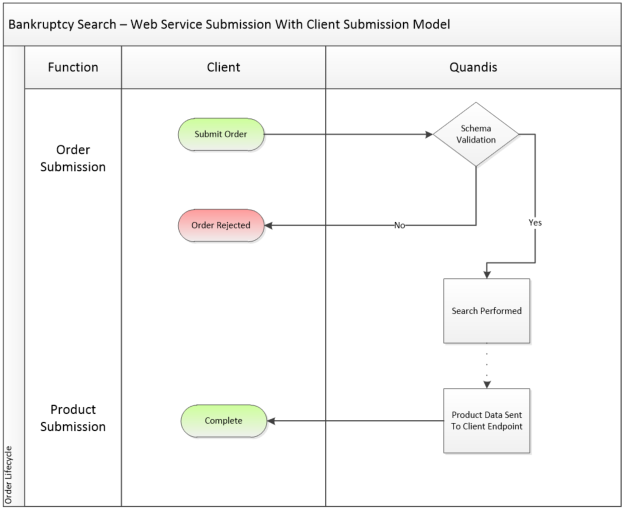
Order Submission Non Pickup Model
The following diagram depicts the QDS Bankruptcy Process for a non pickup scenario. This model encapsulates order submission by client and product submission initiated by Quandis. For each arrow, there is a corresponding Xml message that is sent from party to party. The solid lines represent mandatory messages.
Order Submission Pickup Model
The following diagram depicts the QDS Bankruptcy Process for a pickup scenario. The order submission mirrors the non-pickup model. Product delivery is addressed by the pickup model.


The following table describes the various XML message types used for Bankruptcy search and what stage in the workflow they are utilized:
| Workflow Step | Participant(s) | Schema(s) Utilized | Triggering | Endpoint(s) Utilized |
| Order Placement | Client | API.Order.1.0.0.xsd | By Client | QDS Endpoint |
| Synchronous Acknowledgement | Client | API.Ack.1.0.0.xsd | Synchronous acknowledgement returned during order placement with QDS | N/A |
| Product Data (Non Pickup) | QDS | API.Product.1.0.0.xsd | Product delivery to client initiated by QDS | Client Endpoint |
| Order Pickup | ||||
| Pickup Message List | Client | QDS Pickup Message List.xsd | By client on schedule | QDS Endpoint |
| Pickup Message | Client | API.Product.1.0.0.xsd | Product delivery to client initiated by client | QDS Endpoint |
Key Workflow Steps
The Bankruptcy search process contains key workflow steps or events. The following provides additional detail on these steps.
Order Submission
Order submission originates from the client system. Orders are submitted by using any of the supported protocols. QDS will evaluate the format of the message using schema validation and instantly return a success or failure in the form of a QDS acknowledgment. In the diagram above, this is represented as a separate message but is part of order submission.
PickupList (Only used in Pickup Model)
This is initiated by clients on a scheduled basis in scenarios when order type is designated for pickup. The client will invoke a web service on QDS to obtain a list of completed orders. QDS will return an Xml dataset of completed orders that is used as input for a subsequent web service call to pick up the individual order data.
Product Data
When the order has been processed on QDS, product data will remain ready for pickup or be submitted to the client endpoint.
Client Submission
Under the client submission model, QDS will deliver the product data to the client’s configured endpoint.
Order Pickup
With the pickup model, product data is returned when the client invokes the Pickup Order web service. By invoking the pickup web service, the order is automatically marked as complete. This will remove the order from the PickupList dataset. Order pickup is permitted more than once.
Quandis Bankruptcy search provides bankruptcy information using an individual’s United States Social Security Number (USSSN) or SSN4 along with Party name.
Searches can also be conducted on individuals for whom a valid USSSN is not available, provided the party information (first name, last name, address, city, state, and postal code) are provided as criteria. A typical business scenario would be a co-signer on a loan or title document. Quandis advanced search can locate USSSN based on the above criteria before submitting to the Pacer website. The process will perform a search through our internal service providers to locate the missing USSSN. The provider also provides all known aliases and addresses for reconciliation purposes.
For example:
A search for Jane Progin at 123 Main Street, Springfield, CA, 95370 (USSSN unavailable) could return:
Each line item above is referred to as an alias. The alias is an individual search response from the main contact. Each unique combination of unique USSSN is submitted to Pacer for bankruptcy searching. This ensures all unique combinations USSSN are searched:
Each search returns an PDF image of the search response from Pacer Case Locator (PCL). Each PDF image contains a billing footer with date searched, search criteria and cost. The footer can be used for search result and billing reconciliation.
Searches can also be conducted on Entity names stand-alone for whom a valid EIN/USSSN is generally unavailable. A typical business scenario would be a corporation on a loan or title document. Quandis will normalize the corporation name (if necessary) and search Pacer by Entity name.
For example:
A search with corporation name submitted as ACME Company, LLC. would normalize as:
Pacer is then searched by Entity: ACME Company
Corporations can be provided as standard parties in the order request distinguished by:
Corporate search responses are governed using same Thresholds given Entity searches have the potential to return a broad search response
| Name | Url | Type | State | SubscriberID |
| Alabama Middle Bankruptcy Court | https://ecf.almb.uscourts.gov | ECF | AL | services.quandis.com-Court-ecf.almb.uscourts.gov |
| Alabama Northern Bankruptcy Court | https://ecf.alnb.uscourts.gov | ECF | AL | services.quandis.com-Court-ecf.alnb.uscourts.gov |
| Alabama Southern Bankruptcy Court | https://ecf.alsb.uscourts.gov | ECF | AL | services.quandis.com-Court-ecf.alsb.uscourts.gov |
| Alaska Bankruptcy Court | https://ecf.akb.uscourts.gov | ECF | AK | services.quandis.com-Court-ecf.akb.uscourts.gov |
| Arizona Bankruptcy Court | https://ecf.azb.uscourts.gov | ECF | AZ | services.quandis.com-Court-ecf.azb.uscourts.gov |
| Arkansas Eastern Bankruptcy Court | https://ecf.areb.uscourts.gov | ECF | AR | services.quandis.com-Court-ecf.areb.uscourts.gov |
| Arkansas Western Bankruptcy Court | https://ecf.arwb.uscourts.gov | ECF | AR | services.quandis.com-Court-ecf.arwb.uscourts.gov |
| California Central Bankruptcy Court | https://ecf.cacb.uscourts.gov | ECF | CA | services.quandis.com-Court-ecf.cacb.uscourts.gov |
| California Eastern Bankruptcy Court | https://ecf.caeb.uscourts.gov | ECF | CA | services.quandis.com-Court-ecf.caeb.uscourts.gov |
| California Northern Bankruptcy Court | https://ecf.canb.uscourts.gov | ECF | CA | services.quandis.com-Court-ecf.canb.uscourts.gov |
| California Southern Bankruptcy Court | https://ecf.casb.uscourts.gov | ECF | CA | services.quandis.com-Court-ecf.casb.uscourts.gov |
| Colorado Bankruptcy Court | https://ecf.cob.uscourts.gov | ECF | CO | services.quandis.com-Court-ecf.cob.uscourts.gov |
| Connecticut Bankruptcy Court | https://ecf.ctb.uscourts.gov | ECF | CT | services.quandis.com-Court-ecf.ctb.uscourts.gov |
| Delaware Bankruptcy Court | https://ecf.deb.uscourts.gov | ECF | DE | services.quandis.com-Court-ecf.deb.uscourts.gov |
| District Of Columbia Bankruptcy Court | https://ecf.dcb.uscourts.gov | ECF | DC | services.quandis.com-Court-ecf.dcb.uscourts.gov |
| Florida Middle Bankruptcy Court | https://ecf.flmb.uscourts.gov | ECF | FL | services.quandis.com-Court-ecf.flmb.uscourts.gov |
| Florida Southern Bankruptcy Court | https://ecf.flsb.uscourts.gov | ECF | FL | services.quandis.com-Court-ecf.flsb.uscourts.gov |
| Florida Northern Bankruptcy Court | https://ecf.flnb.uscourts.gov | ECF | FL | services.quandis.com-Court-ecf.flnb.uscourts.gov |
| Georgia Middle Bankruptcy Court | https://ecf.gamb.uscourts.gov | ECF | GA | services.quandis.com-Court-ecf.gamb.uscourts.gov |
| Georgia Northern Bankruptcy Court | https://ecf.ganb.uscourts.gov | ECF | GA | services.quandis.com-Court-ecf.ganb.uscourts.gov |
| Georgia Southern Bankruptcy Court | https://ecf.gasb.uscourts.gov | ECF | GA | services.quandis.com-Court-ecf.gasb.uscourts.gov |
| Guam Bankruptcy Court | https://ecf.gub.uscourts.gov | ECF | GU | services.quandis.com-Court-ecf.gub.uscourts.gov |
| Hawaii Bankruptcy Court | https://ecf.hib.uscourts.gov | ECF | HI | services.quandis.com-Court-ecf.hib.uscourts.gov |
| Idaho Bankruptcy Court | https://ecf.idb.uscourts.gov | ECF | ID | services.quandis.com-Court-ecf.idb.uscourts.gov |
| Illinois Central Bankruptcy Court | https://ecf.ilcb.uscourts.gov | ECF | IL | services.quandis.com-Court-ecf.ilcb.uscourts.gov |
| Illinois Northern Bankruptcy Court | https://ecf.ilnb.uscourts.gov | ECF | IL | services.quandis.com-Court-ecf.ilnb.uscourts.gov |
| Illinois Southern Bankruptcy Court | https://ecf.ilsb.uscourts.gov | ECF | IL | services.quandis.com-Court-ecf.ilsb.uscourts.gov |
| Indiana Northern Bankruptcy Court | https://ecf.innb.uscourts.gov | ECF | IN | services.quandis.com-Court-ecf.innb.uscourts.gov |
| Indiana Southern Bankruptcy Court | https://ecf.insb.uscourts.gov | ECF | IN | services.quandis.com-Court-ecf.insb.uscourts.gov |
| Iowa Northern Bankruptcy Court | https://ecf.ianb.uscourts.gov | ECF | IA | services.quandis.com-Court-ecf.ianb.uscourts.gov |
| Iowa Southern Bankruptcy Court | https://ecf.iasb.uscourts.gov | ECF | IA | services.quandis.com-Court-ecf.iasb.uscourts.gov |
| Kansas Bankruptcy Court | https://ecf.ksb.uscourts.gov | ECF | KS | services.quandis.com-Court-ecf.ksb.uscourts.gov |
| Kentucky Eastern Bankruptcy Court | https://ecf.kyeb.uscourts.gov | ECF | KY | services.quandis.com-Court-ecf.kyeb.uscourts.gov |
| Kentucky Western Bankruptcy Court | https://ecf.kywb.uscourts.gov | ECF | KY | services.quandis.com-Court-ecf.kywb.uscourts.gov |
| Louisiana Eastern Bankruptcy Court | https://ecf.laeb.uscourts.gov | ECF | LA | services.quandis.com-Court-ecf.laeb.uscourts.gov |
| Louisiana Middle Bankruptcy Court | https://ecf.lamb.uscourts.gov | ECF | LA | services.quandis.com-Court-ecf.lamb.uscourts.gov |
| Louisiana Western Bankruptcy Court | https://ecf.lawb.uscourts.gov | ECF | LA | services.quandis.com-Court-ecf.lawb.uscourts.gov |
| Maine Bankruptcy Court | https://ecf.meb.uscourts.gov | ECF | ME | services.quandis.com-Court-ecf.meb.uscourts.gov |
| Maryland Bankruptcy Court | https://ecf.mdb.uscourts.gov | ECF | MD | services.quandis.com-Court-ecf.mdb.uscourts.gov |
| Massachusetts Bankruptcy Court | https://ecf.mab.uscourts.gov | ECF | MA | services.quandis.com-Court-ecf.mab.uscourts.gov |
| Michigan Eastern Bankruptcy Court | https://ecf.mieb.uscourts.gov | ECF | MI | services.quandis.com-Court-ecf.mieb.uscourts.gov |
| Michigan Western Bankruptcy Court | https://ecf.miwb.uscourts.gov | ECF | MI | services.quandis.com-Court-ecf.miwb.uscourts.gov |
| Minnesota Bankruptcy Court | https://ecf.mnb.uscourts.gov | ECF | MN | services.quandis.com-Court-ecf.mnb.uscourts.gov |
| Mississippi Northern Bankruptcy Court | https://ecf.msnb.uscourts.gov | ECF | MS | services.quandis.com-Court-ecf.msnb.uscourts.gov |
| Mississippi Southern Bankruptcy Court | https://ecf.mssb.uscourts.gov | ECF | MS | services.quandis.com-Court-ecf.mssb.uscourts.gov |
| Missouri Eastern Bankruptcy Court | https://ecf.moeb.uscourts.gov | ECF | MO | services.quandis.com-Court-ecf.moeb.uscourts.gov |
| Missouri Western Bankruptcy Court | https://ecf.mowb.uscourts.gov | ECF | MO | services.quandis.com-Court-ecf.mowb.uscourts.gov |
| Montana Bankruptcy Court | https://ecf.mtb.uscourts.gov | ECF | MT | services.quandis.com-Court-ecf.mtb.uscourts.gov |
| Nebraska Bankruptcy Court | https://ecf.neb.uscourts.gov | ECF | NE | services.quandis.com-Court-ecf.neb.uscourts.gov |
| Nevada Bankruptcy Court | https://ecf.nvb.uscourts.gov | ECF | NV | services.quandis.com-Court-ecf.nvb.uscourts.gov |
| New Hampshire Bankruptcy Court | https://ecf.nhb.uscourts.gov | ECF | NH | services.quandis.com-Court-ecf.nhb.uscourts.gov |
| New Jersey Bankruptcy Court | https://ecf.njb.uscourts.gov | ECF | NJ | services.quandis.com-Court-ecf.njb.uscourts.gov |
| New Mexico Bankruptcy Court | https://ecf.nmb.uscourts.gov | ECF | NM | services.quandis.com-Court-ecf.nmb.uscourts.gov |
| New York Eastern Bankruptcy Court | https://ecf.nyeb.uscourts.gov | ECF | NY | services.quandis.com-Court-ecf.nyeb.uscourts.gov |
| New York Northern Bankruptcy Court | https://ecf.nynb.uscourts.gov | ECF | NY | services.quandis.com-Court-ecf.nynb.uscourts.gov |
| New York Southern Bankruptcy Court | https://ecf.nysb.uscourts.gov | ECF | NY | services.quandis.com-Court-ecf.nysb.uscourts.gov |
| New York Southern Bankruptcy Court | https://ecf-closed.nysb.uscourts.gov | ECF | NY | services.quandis.com-Court-ecf-closed.nysb.uscourts.gov |
| New York Western Bankruptcy Court | https://ecf.nywb.uscourts.gov | ECF | NY | services.quandis.com-Court-ecf.nywb.uscourts.gov |
| North Carolina Eastern Bankruptcy Court | https://ecf.nceb.uscourts.gov | ECF | NC | services.quandis.com-Court-ecf.nceb.uscourts.gov |
| North Carolina Middle Bankruptcy Court | https://ecf.ncmb.uscourts.gov | ECF | NC | services.quandis.com-Court-ecf.ncmb.uscourts.gov |
| North Carolina Western Bankruptcy Court | https://ecf.ncwb.uscourts.gov | ECF | NC | services.quandis.com-Court-ecf.ncwb.uscourts.gov |
| North Dakota Bankruptcy Court | https://ecf.ndb.uscourts.gov | ECF | ND | services.quandis.com-Court-ecf.ndb.uscourts.gov |
| Northern Mariana Islands Bankruptcy Court | https://ecf.nmib.uscourts.gov | ECF | NMI | services.quandis.com-Court-ecf.nmib.uscourts.gov |
| Ohio Northern Bankruptcy Court | https://ecf.ohnb.uscourts.gov | ECF | OH | services.quandis.com-Court-ecf.ohnb.uscourts.gov |
| Ohio Southern Bankruptcy Court | https://ecf.ohsb.uscourts.gov | ECF | OH | services.quandis.com-Court-ecf.ohsb.uscourts.gov |
| Oklahoma Eastern Bankruptcy Court | https://ecf.okeb.uscourts.gov | ECF | OK | services.quandis.com-Court-ecf.okeb.uscourts.gov |
| Oklahoma Western Bankruptcy Court | https://ecf.okwb.uscourts.gov | ECF | OK | services.quandis.com-Court-ecf.okwb.uscourts.gov |
| Oklahoma Northern Bankruptcy Court | https://ecf.oknb.uscourts.gov | ECF | OK | services.quandis.com-Court-ecf.oknb.uscourts.gov |
| Oregon Bankruptcy Court | https://ecf.orb.uscourts.gov | ECF | OR | services.quandis.com-Court-ecf.orb.uscourts.gov |
| Pennsylvania Eastern Bankruptcy Court | https://ecf.paeb.uscourts.gov | ECF | PA | services.quandis.com-Court-ecf.paeb.uscourts.gov |
| Pennsylvania Middle Bankruptcy Court | https://ecf.pamb.uscourts.gov | ECF | PA | services.quandis.com-Court-ecf.pamb.uscourts.gov |
| Pennsylvania Western Bankruptcy Court | https://ecf.pawb.uscourts.gov | ECF | PA | services.quandis.com-Court-ecf.pawb.uscourts.gov |
| Puerto Rico Bankruptcy Court | https://ecf.prb.uscourts.gov | ECF | PR | services.quandis.com-Court-ecf.prb.uscourts.gov |
| Rhode Island Bankruptcy Court | https://ecf.rib.uscourts.gov | ECF | RI | services.quandis.com-Court-ecf.rib.uscourts.gov |
| South Carolina Bankruptcy Court | https://ecf.scb.uscourts.gov | ECF | SC | services.quandis.com-Court-ecf.scb.uscourts.gov |
| South Dakota Bankruptcy Court | https://ecf.sdb.uscourts.gov | ECF | SD | services.quandis.com-Court-ecf.sdb.uscourts.gov |
| Tennessee Eastern Bankruptcy Court | https://ecf.tneb.uscourts.gov | ECF | TN | services.quandis.com-Court-ecf.tneb.uscourts.gov |
| Tennessee Middle Bankruptcy Court | https://ecf.tnmb.uscourts.gov | ECF | TN | services.quandis.com-Court-ecf.tnmb.uscourts.gov |
| Tennessee Western Bankruptcy Court | https://ecf.tnwb.uscourts.gov | ECF | TN | services.quandis.com-Court-ecf.tnwb.uscourts.gov |
| Texas Eastern Bankruptcy Court | https://ecf.txeb.uscourts.gov | ECF | TX | services.quandis.com-Court-ecf.txeb.uscourts.gov |
| Texas Northern Bankruptcy Court | https://ecf.txnb.uscourts.gov | ECF | TX | services.quandis.com-Court-ecf.txnb.uscourts.gov |
| Texas Southern Bankruptcy Court | https://ecf.txsb.uscourts.gov | ECF | TX | services.quandis.com-Court-ecf.txsb.uscourts.gov |
| Texas Western Bankruptcy Court | https://ecf.txwb.uscourts.gov | ECF | TX | services.quandis.com-Court-ecf.txwb.uscourts.gov |
| Utah Bankruptcy Court | https://ecf.utb.uscourts.gov | ECF | UT | services.quandis.com-Court-ecf.utb.uscourts.gov |
| Vermont Bankruptcy Court | https://ecf.vtb.uscourts.gov | ECF | VT | services.quandis.com-Court-ecf.vtb.uscourts.gov |
| Virginia Eastern Bankruptcy Court | https://ecf.vaeb.uscourts.gov | ECF | VA | services.quandis.com-Court-ecf.vaeb.uscourts.gov |
| Virginia Western Bankruptcy Court | https://ecf.vawb.uscourts.gov | ECF | VA | services.quandis.com-Court-ecf.vawb.uscourts.gov |
| Virgin Islands Bankruptcy Court | https://ecf.vib.uscourts.gov/ | ECF | VI | services.quandis.com-Court-ecf.vib.uscourts.gov |
| Washington Eastern Bankruptcy Court | https://ecf.waeb.uscourts.gov | ECF | WA | services.quandis.com-Court-ecf.waeb.uscourts.gov |
| Washington Western Bankruptcy Court | https://ecf.wawb.uscourts.gov | ECF | WA | services.quandis.com-Court-ecf.wawb.uscourts.gov |
| West Virginia Northern Bankruptcy Court | https://ecf.wvnb.uscourts.gov | ECF | WV | services.quandis.com-Court-ecf.wvnb.uscourts.gov |
| West Virginia Southern Bankruptcy Court | https://ecf.wvsb.uscourts.gov | ECF | WV | services.quandis.com-Court-ecf.wvsb.uscourts.gov |
| Wisconsin Eastern Bankruptcy Court | https://ecf.wieb.uscourts.gov | ECF | WI | services.quandis.com-Court-ecf.wieb.uscourts.gov |
| Wisconsin Western Bankruptcy Court | https://ecf.wiwb.uscourts.gov | ECF | WI | services.quandis.com-Court-ecf.wiwb.uscourts.gov |
| Wyoming Bankruptcy Court | https://ecf.wyb.uscourts.gov | ECF | WY | services.quandis.com-Court-ecf.wyb.uscourts.gov |