
Version 1.30
2023.01.13
Copyright © 2013 by Quandis. All rights reserved. This document contains confidential and privileged material for the sole use of the intended reader. Any review or distribution not expressly authorized herein is strictly prohibited. The XML structure and definition of this document represents material that is protected by international and federal copyright and trademark laws and Quandis is the sole owner of all intellectual property contained in this document. Any use or reuse of this XML structure or format is strictly prohibited and constitutes a violation of Quandis’ Copyright and other intellectual property protection. The information contained within this document represents confidential information as governed and defined in the Quandis Non-Disclosure Agreement to which the user has agreed by virtue of such user’s use of the information contained herein. If you are not the intended reader of this document please contact Quandis and destroy all copes and even if you are not he intended recipient, you are still subject to the all rights reserved by Quandis and the protections set forth herein or any other rights enjoyed by Quandis for any reason whatsoever. No part of this document may be reproduced, stored, archived, or transmitted in any form without the express written consent of Quandis.
Quandis has used its best effort in preparing this document. Quandis makes no representations, or warranties with respect to the accuracy or completeness of this document and specifically disclaims any implied warranties or merchantability or fitness for a particular purpose. Quandis shall have no liability to any party wherever located because of any use or attempted use of this document.
Table of Contents
Revision History
Overview
Objective
Definitions
System Connectivity
Security Model
ADR Environments
Submission URLs
Data Submission
Submission Checklist
HTTP Response Status
Interpreting Import Result XML
Supported Operations
Data Binding
SubscriberID Patterns
Data Binding Scenarios
Scenario 1 – Updating a Process Record Using a SubscriberID
Scenario 2 – Updating Child Records During Process Update Using a SubscriberID
Scenario 3 – Updating Child Records Using Stand-Alone Format Using a SubscriberID
Scenario 4 – Updating a Process Record Using Autobind
Scenario 5 – Updating Child Records During Process Update Using Autobind
Scenario 6 – Updating Child Records Using Stand-Alone Format Using Autobind
Operations
Data Definition Legend
Foreclosure – New Referral
Foreclosure Update
POC – New Referral
POC Update
MFR – New Referral
MFR – Update
Message
Document
ImportForm
Embedded Object Structures
Total Debt Ledger
Pre Post Petition Ledger
Decision Delay
Import Form
Messages
Documents
Appendix A: Workflow Steps
Appendix B: Decision Delay Templates
Appendix C: Court List
Appendix D: Ledger Templates
Appendix E: FAQ & Troubleshooting
Appendix F: ADR Certification Checklist
Appendix G: Required Foreclosure Documents
Appendix H: Import Dashboard
Appendix I: Attachment Templates
| Date | Version | Description |
| 2013-05-20 | 1.0 | Initial Release |
| 2013-05-20 | 1.1 | Fixed Typo in checklist in Security Model. Adjusted ImportResult data definition table. |
| 2013-05-21 | 1.2 | Adjusted definitions, Security Model and FAQ. |
| 2013-05-24 | 1.3 | Updated URLs and Appendix A. Added ADR Certification Checklist. |
| 2013-05-28 | 1.4 | Updated Bankruptcy templates in Appendix A. |
| 2013-05-31 | 1.5 | Updated field requirements. |
| 2013-07-25 | 1.6 | Updated workflow steps for: Alabama and Michigan. Added workflow for Texas Home Equity, Nebraska (Non Judicial). See Appendix A. Court names updated. See Appendix D. Added Appendix H for Required Documents. Removed DateClosed and ClosedReason from Foreclosure, MFR and POC referral schemas. DateClosed and ClosedReason can be passed in the Update method. Added Appendix I for Import Dashboard. |
| 2013-12-06 | 1.7 | Removed step ‘Notice of Default’ for Alabama Non-Judicial. Added ‘Litigation Detail’ as type of delay. Added Opening Bid Amount as required value for ‘Foreclosure Sale Held’ step. |
| 2014-01-27 | 1.8 | Added Judicial Wofkflows for Alaska, Alabama, Arkansas, Arizona, Minnesota, Missouri, Montana and Nevada. Added Non Judicial workflow for Hawaii.Foreclosure Sale Held task – UPB is required when completing the task and value must be greater than $0. If the property is identified as being sold to a 3rd party or undisclosed, the Sale Amount must be greater than $100.Made Bar Date non mandatory while creating new MFR or POC referrals. |
| 2014-02-24 | 1.9 | Add Michigan Judicial workflow. Added max length for text fields. |
| 2014-03-19 | 1.10 | Removed “Redemption Period Expires” step from PA process. Additional data requirements for the “Foreclosure Sale Held” step. |
| 2014-04-23 | 1.11 | Made Court Case number mandatory while completing “Complaint Filed” step.Change in sequence for Rhode Island template. |
| 2014-05-08 | 1.12 | Changed step name for Rhode Island workflow. |
| 2014-06-26 | 1.13 | Added NY Co-op workflow |
| 2014-07-15 | 1.14 | Changed steps for CO Non-Judicial workflow |
| 2014-08-15 | 1.15 | Updated Attachment Template setting to “Many Per Parent” for “FC Document” and “Affidavit of Service”. |
| 2014-09-18 | 1.16 | Updated list of Workflows. Added list of Attachment Templates. |
| 2015-02-23 | 1.17 | Updated list of Workflows. Templates for CO Non Judicial, CT Judicial, LA Judicial (Executory), MN Non Judicial, NJ Judicial, NV Non Judicial, NY Co-op, PR Judicial, RI Non Judicial, WA Judicial, and WV Non Judicial have been added/updated. See Appendix A for details.Updated ImportForm Data Definition and Sample XML. |
| 2015-06-02 | 1.18 | Added OR Non-Judicial workflowAdded CA Judicial workflowUpdated NY Co-Op workflowUpdated MI Non-Judicial workflow |
| 2017-02-10 | 1.19 | Updated DecisionDelayTemplate listAdded ImportForm Message requirementAdded Bankruptcy Case Closure requirementsRemoved Workflow Steps Table and added reference to Attorney User Guide; to be maintained thereRemoved DCS Milestone Appendix (B)Added Foreclosure and Bankruptcy Closed Reason Enumerations |
| 2017-08-17 | 1.20 | Added Foreclosure and Bankruptcy Case Closure ImportForm data elements |
| 2017-09-17 | 1.21 | Synced Foreclosure and ForeclosureUpdate operations; general cleanup |
| 2018-08-15 | 1.22 | Added new elements required for ordering Title |
| 2018-11-16 | 1.23 | Added ProcessType in Foreclosure Operation sample XML |
| 2019-10-18 | 1.24 | Added Autobind documentation; updated all Operations and their schemas to account for conditional requirements based on Autobind addition |
| 2020-01-14 | 1.25 | Removed Autobind from standalone Operations; not currently supported |
| 2020-02-22 | 1.26 | Added Total Debt Ledger Posted Date to ImportForm operation |
| 2022-06-21 | 1.27 | Added single line item to Troubleshooting section |
| 2022-06-29 | 1.28 | Added “HAF” to list of Hold Templates in Appendix B; general clean-up for that table |
| 2022-09-06 | 1.29 | Added Converted Date, Discharged Date and Dismissed Date elements |
| 2023-01-13 | 1.30 | Removed all references to the “Restart” Operation. Restart feature is no longer available |
| 2025-01-28 | 1.31 | Added errors related to Bid information to Troubleshooting Errors section in Appendix E; Changed required fields to conditional where appropriate |
This document is a technical guide integrating attorney system with Freddie ADR system. It describes transmission protocols utilized, xml messaging and schema requirements. It will also outline general usage and common error types.
It is written for both prospective and new system integrators, consultants and other technical professionals interested in integrating with ADR.
The following terms are referred to in this document.
| Term | Definition |
| ADR | Attorney Data Reporting System |
| Endpoint | Web service or HTTP receiver that is exposed by an organization to receive inbound data |
| QBO | Acronym for Quandis Business Objects. Generally refers to any module or component that has been created by Quandis. |
| ImportForm | QBO term used to represent a tracking step in ADR. Formerly known as Milestone in DCS. Synonymous with task or step in other systems. |
| REST | Acronym for Representational State Transfer |
| HTTPS | Acronym for Hypertext Transfer Protocol Secure. See http://en.wikipedia.org/wiki/HTTP_Secure |
| BASIC Authentication | HTTP authentication method. Seehttp://tools.ietf.org/html/rfc2617http://en.wikipedia.org/wiki/Basic_access_authentication |
| Process Object / Process Record | Refers to a process record in ADR. Process records are database records which represent a Foreclosure, MFR and POC. |
| ImportForm | Object structure used in ADR for step tracking within an ADR process. Formerly known as Milestone in DCS. |
| DecisionDelay | Object structure used in ADR to track delays within a process. |
| Message | Object structure used in ADR to store note or memo data. |
| Ledger | Object structure used to ADR to store accounting information. |
| ADR Certification | Certification process in which integrators must successfully complete before they are allowed submit data to the ADR production environment. |
ADR receives data via the public internet using HTTPS (2048 bit) protocol as the standard protocol. VPN connectivity is supported under special circumstances. ADR supports REST service API.
ADR uses BASIC Authentication as the primary authentication method. Authentication is obtained by specifying the security credentials provided by Quandis
In order to successfully authenticate with the ADR API, the following HTTP headers must be observed:
| HTTP Header | Additional Notes |
| Authorization | Quandis will procure credentials for each ADR environment. These credentials must be supplied with each call. The credentials are used to construct the BASIC authentication header. |
| User-Agent OR SOAPAction | Ensure HTTP header “User-Agent” is nonexistent in the call or the HTTP header “SOAPAction” exists with a value. By satisfying either, ADR infers the call is an automated request and issues a Basic Authentication challenge instead of redirecting for forms authentication. |
ADR exposes the following environments
| Environment | Purpose | Hostname |
| DEV | Development environment used for initial connectivity and integration tests | devadr.quandis.net |
| UAT | QA environment used for system integration testing | |
| PROD | Production environment |
ADR exposes separate URLs for each resource. The URLs follow the pattern:
http://{baseUrn}/Import/Import.ashx/{OperationName}
The following are examples of URLs to distinct ADR resources:
| URL | Description |
| https://devadr.quandis.net/Import/Import.ashx/Foreclosure | Resource used to call Foreclosure operation in ADR development environment |
| https://uatadr.quandis.net/Import/Import.ashx/ImportForm | Resource used to call ImportForm operation in ADR UAT environment |
| https://www.freddiemacadr.com/Import/Import.ashx/MFR | Resource used to call MFR operation in ADR production environment |
Unless otherwise specified all ADR operations must be performed as HTTP POST. Please refer to the full list of operations in the Supported Operations section of the integration guide.
To submit data to ADR, the following criteria must be met:
| Item | Details |
| HTTP Headers correctly set | Refer to “Security Model” |
| URL Resource must be specified | Refer to “Submission URLs”. |
| HTTP Method | Must be set to “POST” |
| Xml Content must be in correct format | Refer To “Operations”. The format of the Xml must match the schema format associated with the operation |
The following diagram depicts the processing flow of an ADR Import submission.
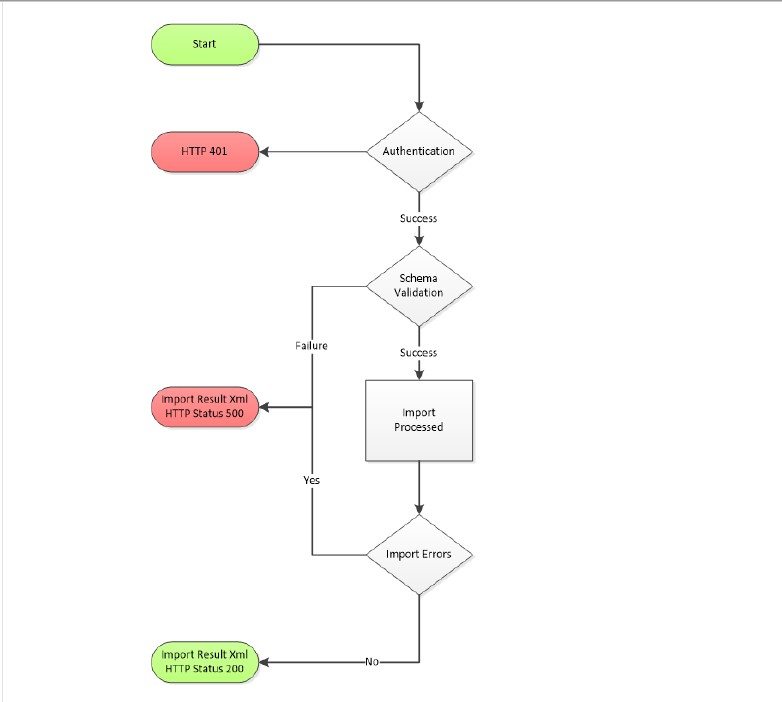
Upon submission, the ADR resource will return HTTP status. Any status other than 200 indicates a problem with the submission. The following table outlines the possible statuses:
| HTTP Status | Description |
| 200 | Success. Refer to Import Result XML |
| 401 | Login failure. Check credentials and ensure credentials match environment |
| 500 | Failure(s) occurred. Refer to Import Result Xml for additional detail |
Import Result is the XML output returned by the ADR Import resource. It is important to observe the XML is returned in both successful and non-successful scenarios. The Xml format contains summary information and detail information. Depending on the operation invoked, the detail information can contain one or many items.
The following table outlines the various attributes of an Import Result:
| Node | Required | Type | Length | Description / Enumerations | ||
| ImportResults | Y | N | Contains summary information for import operation | |||
| ID | Y | I | ImportFileID. Searchable in ADR | |||
| SuccessCount | Y | I | Successful objects inserted or updated. | |||
| WarningCount | Y | I | Warning Count | |||
| ErrorCount | Y | I | Error Count | |||
| Status | Y | E | Complete, Error, Validation Error | |||
| ImportStart | Y | D | Import Start Time | |||
| ImportComplete | Y | D | Import Complete Time | |||
| Reference | N | T | Reference Value provided by client. Searchable in ADR | |||
| Result | N | N | Individual Operation Result | |||
| ID | Y | I | ImportLogID. Searchable in ADR | |||
| Reference | N | O, T | Reference provided by client for individual operation. Searchable in ADR | |||
| Object | Y | T | Object affected by Import | |||
| ObjectID | N | I | ObjectID of Object | |||
| Operation | Y | T | Operation performed on object. | |||
| Status | Y | T | Outcome of operation. Success, Error | |||
| Message | O | T | Only produced when Operation results in Error. Reason for Operation error | |||
| Properties | O | N | Collection of object properties. Will be omitted if Reference attribute is provided at Operation level | |||
Data binding is the ability to locate an existing record on a subsequent submission during automation. Data binding locates the process object using one of the following methods:
Process objects are the primary referral types which consist of:
There are two scenarios when data binding is utilized:
When XML data is submitted to ADR, a SubscriberID can be included in each XML message, which enables the message to be uniquely identified. ADR schemas will utilize SubscriberID patterns in two different formats:
The format of SubscriberIDs follows a general pattern. In addition, there are several key aspects of the SubscriberID pattern that must be adhered to at all times. Consider:
When a SubscriberID is not provided, ADR will utilize the Freddie Mac Loan Number and Attorney Case ID to uniquely identify the case. Updates to Processes and their child objects can be performed using this method. If multiple records with the same Attorney Case ID are present, Autobind will bind to the active case first, and if no active case is present, it will bind to the most recent case, based on the DateOpened value.
Two assumptions are made in regards to the Attorney Case ID when using the Autobind method for data binding:
Updating a process record is the ability to submit an update that will locate a given process and update the record. Common scenarios include:
In both of these scenarios, the Xml submitted contains a process object structure that contains a SubscriberID which uniquely identifies the process record. An example of a process update is:
<ImportCollection>
<MFRItem>
<SubscriberID>http://www.attorney.com-MFR-1000000</SubscriberID>
<DateClosed>2013-01-01</DateClosed>
<ClosedReason>Reinstated</ClosedReason>
</MFRItem>
</ImportCollection>
Most objects tied to a process can be updated by nesting them in a process update. The following example shows how to update an ImportForm as part of a process update:
<ImportCollection>
<MFRItem>
<SubscriberID>http://www.attorney.com-MFR-1000000</SubscriberID>
<Forms>
<ImportFormItem>
<Template>Bankruptcy File Received</Template>
<ActualCompletion>2013-01-01</ActualCompletion>
<Messages_0_Message>Task Changed</Messages_0_Message>
<Messages_0_BodyText>Task changed because of this reason</Messages_0_BodyText>
</ImportFormItem>
</Forms>
</MFRItem>
</ImportCollection>
By nesting the ImportForm in the process update, the ImportForm record is automatically bound the process record.
An alternate way to update ImportForms is to submit them stand-alone or outside of the process update. Updating an ImportForm using a non process object format or stand-alone format requires the object to be submitted with a format that contains a reference to the process object using the Object/ObjectSubscriberID format. An example of a stand-alone update is:
<ImportCollection>
<ImportFormItem>
<Object>Bankruptcy</Object>
<ObjectSubscriberID>http://www.attorney.com-MFR-1000000</ObjectSubscriberID>
<Template>Bankruptcy File Received</Template>
<ActualCompletion>2013-01-01</ActualCompletion>
<Messages_0_Message>Task Changed</Messages_0_Message>
<Messages_0_BodyText>Task changed because of this reason</Messages_0_BodyText>
</ImportFormItem>
</ImportCollection>
Updating a process record is the ability to submit an update that will locate a given process and update the record. Common scenarios include:
In both of these scenarios, the Xml submitted contains a process object structure that contains the Attorney Case ID which uniquely identifies the process record. An example of a process update is:
<ImportCollection>
<MFRItem>
<MFR>010.X9899.19</MFR>
<DateClosed>2019-10-01</DateClosed>
<ClosedReason>Motion Granted</ClosedReason>
</MFRItem>
</ImportCollection>
Most objects tied to a process can be updated by nesting them in a process update. The following example shows how to update an ImportForm as part of a process update:
<ImportCollection>
<ForeclosureItem>
<Foreclosure>19-FC12345</Foreclosure>
<Loan>
<Agency>Freddie Mac</Agency>
<Loan>000135114</Loan>
</Loan>
<Forms>
<ImportFormItem>
<Template>Foreclosure File Received</Template>
<ActualCompletion>2019-10-01</ActualCompletion>
<Messages_0_Messsage>Task Changed</Messages_0_Message>
<Messages_0_BodyText>Task changed because of this reason</Messages_0_BodyText>
</ImportFormItem>
</Forms>
</ForeclosureItem>
</ImportCollection>
By nesting the ImportForm in the process update, the ImportForm record is automatically bound the process record.
The following is the list of operations supported by ADR Attorney Integration API.
| Operation | Description | Stand-Alone | Schema File |
| Foreclosure | Creates new Foreclosure referral | No | Foreclosure.xsd |
| ForeclosureUpdate | Updates existing Foreclosure, including updating status, sale information, financial information, delays and forms. | No | Foreclosure.Update.xsd |
| POC | Creates new POC referral | No | POC.xsd |
| POCUpdate | Used to update an existing POC, including updating status, sale information, financial information delays and forms. | No | POC.Update.xsd |
| MFR | Creates new new MFR referral | No | MFR.xsd |
| MFRUpdate | Can be used to update an existing MFR, including updating status, sale information, financial information, delays and forms. | No | MFR.Update.xsd |
| Message | Adds message on an existing Foreclosure, POC or MFR referral | Yes | Message.xsd |
| Document | Adds document on an existing Foreclosure, POC or MFR referral | Yes | Document.xsd |
| ImportForm | Updates ImportForm (aka Steps/Milestones/Tasks) on an existing Foreclosure, POC or MFR referral | Yes | ImportForm.xsd |
| Result | Returns import result Xml from an individual submission. This call must be performed as a HTTP GET. | N/A | N/A |
The following table provides a definition on the Required and Type columns for field definition.
| Category | Enumeration | Description |
| Required | Y | YES. Item is required |
| Required | N | No. Items is not required |
| Required | O | Optional. Optionally required and pertains to parent nodes |
| Required | C | Conditional. Required under certain conditions (see Description) |
| Type | N | Node. Represents parent-most node of embedded object structure |
| Type | E | Enumerated. See Description or schema for details |
| Type | A | Xml Attribute |
| Type | T | Text |
| Type | D | Date. Acceptable formats are: YYYY-MM-DD YYYY-MM-DDTHH:MM:SS YYYY-MM-DDTHH:MM:SS+HH:MM YYYY-MM-DDTHH:MM:SS-HH:MM YYYY-MM-DDTHH:MM:SSZ |
| Type | M | Money |
| Type | I | Integer |
This operation can be used to create a new Foreclosure referral.
****The structure of the XML submitted must follow the order found in the table below****
Data Definition
| Node | Required | Type | Length | Description / Enumerations | ||||
| ImportCollection | N | |||||||
| Reference | N | A | Job number of submission | |||||
| ForeclosureItem | Y | N | ||||||
| Reference | N | A | 50 | Unique value representing Foreclosure record in attorney CMS | ||||
| SubscriberID | N | T | 255 | Unique Foreclosure identified in following pattern: http://www.<AttorneyName>.com-Foreclosure-<Loan> | ||||
| Loan | Y | N | ||||||
| Agency | Y | E | Will always be “Freddie Mac” | |||||
| Loan | Y | T | 9 | Valid FreddieMac Loan Number | ||||
| Property_Address | N | T | 100 | Property Address | ||||
| Property_City | N | T | 50 | Property City | ||||
| Property_PostalCode | N | T | 10 | Property Postal Code; 5-digit or 5+4 digit | ||||
| ServicerLoanID | Y | T | 100 | Servicer’s Loan Number | ||||
| LoanType | N | E | Conventional, FHA, VA, USDA | |||||
| OriginalBalance | Y | M | Original Loan Amount | |||||
| UPBAmount | Y | M | Current Unpaid Principal Balance | |||||
| LienPriorityType | N | I | Indicates Lien Position; Enumerations: 1, 2 | |||||
| PublicRecords | N | N | ||||||
| PublicRecordItem | C | N | Required when providing PublicRecords element | |||||
| PublicRecord | C | E | Required when providing PublicRecords element Will always be “Mortgage Deed of Trust” | |||||
| FilingDate | N | D | Deed of Trust Dated Date | |||||
| RecordingDate | N | D | Deed of Trust Recording Date | |||||
| Borrowers | N | |||||||
| BorrowerItem | Y | N | At least one BorrowerItem required | |||||
| LastName | Y | T | 50 | Combined length of LastName + FirstName cannot exceed 50 Characters | ||||
| FirstName | Y | T | 50 | Combined length of LastName + FirstName cannot exceed 50 Characters | ||||
| BorrowerType | Y | E | Primary, Secondary | |||||
| USSSN | N | T | 11 | |||||
| Address | N | T | 50 | Mailing Street Address for Borrower(s) | ||||
| City | N | T | 50 | Mailing City for Borrower(s) | ||||
| State | N | T | 2 | Mailing State for Borrower(s) | ||||
| PostalCode | N | T | 10 | Mailing Postal Code for Borrower(s) | ||||
| Sequence | Y | I | Indicates borrower sequence. Sequence value must be the same on subsequent submissions | |||||
| Foreclosure | Y | T | 50 | Attorney reference number/Case ID | ||||
| DateOpened | Y | D | ||||||
| Status | Y | E | “Open”, “On Hold”, “Closed” | |||||
| ProcessType | O | E | “Judicial”, “Non Judicial”, “Home Equity”, “Co-op” | |||||
| N | D | |||||||
| SaleAmount | N | M | ||||||
| SoldToName | N | E | “Back to Beneficiary”, “Third Party”, “Reverted to Senior”, “Undisclosed” | |||||
| ScheduledSaleDate | N | D | ||||||
| RedemptionDate | N | D | ||||||
| DeficiencyStatus | O | E | “Waived”, “Preserved” | |||||
| RedemptionAmount | N | M | ||||||
| TotalDebtLedger | N | N | Refer to Total Debt Ledger | |||||
| Delays | O | N | Refer To Decision Delay | |||||
| Forms | O | N | Refer To Import Forms | |||||
| Messages | O | N | Refer To Messages | |||||
| Attachments | O | N | Refer To Documents | |||||
| OpeningBidAmount | O | M | ||||||
Sample XML
<ImportCollection>
<ForeclosureItem>
<SubscriberID>http://www.attorney.com-Foreclosure-10000053</SubscriberID>
<Loan>
<Agency>Freddie Mac</Agency>
<Loan>408693568</Loan>
<Property_Address>601 E Hampton St</Property_Address>
<Property_City>Riverside</Property_City>
<Property_PostalCode>91406</Property_PostalCode>
<ServicerLoanID>00001255568</ServicerLoanID>
<LoanType>Conventional</LoanType>
<OriginalBalance>155765.33</OriginalBalance>
<UPBAmount>135400.44</UPBAmount>
<LienPriorityType>1</LienPriorityType>
<PublicRecords>
<PublicRecordItem>
<PublicRecord>Mortgage Deed of Trust</PublicRecord>
<FilingDate>2015-07-21</FilingDate>
<RecordingDate>2015-07-25</RecordingDate>
</PublicRecordItem>
</PublicRecords>
<Borrowers>
<BorrowerItem>
<LastName>Doe</LastName>
<FirstName>Jane</FirstName>
<BorrowerType>Primary</BorrowerType>
<USSSN>555124444</USSSN>
<Address>123 Maple</Address>
<City>Miami</City>
<State>FL</State>
<PostalCode>33135</PostalCode>
<Sequence>1</Sequence>
</BorrowerItem>
<BorrowerItem>
<LastName>Doe</LastName>
<FirstName>John</FirstName>
<BorrowerType>Primary</BorrowerType>
<USSSN>555124445</USSSN>
<Address>123 Maple</Address>
<City>Miami</City>
<State>FL</State>
<PostalCode>33135</PostalCode>
<Sequence>2</Sequence>
</BorrowerItem>
</Borrowers>
</Loan>
<Foreclosure>10000053</Foreclosure>
<DateOpened>2013-03-22</DateOpened>
<ProcessType>Non Judicial</ProcessType>
<TotalDebtLedger>
<Template>Total Debt</Template>
<Items>
<AccruedLateCharges>15.00</AccruedLateCharges>
<PendingAdvances>25</PendingAdvances>
<FCFeesCosts>
<Items>
<ForeclosureFee>15</ForeclosureFee>
</Items>
</FCFeesCosts>
</Items>
</TotalDebtLedger>
<Forms>
<ImportFormItem>
<Template>Foreclosure File Received</Template>
<ProjectedCompletion>2013-04-25</ProjectedCompletion>
<ActualCompletion>2013-05-02</ActualCompletion>
<Messages_0_Message>Task Changed</Messages_0_Message>
<Messages_0_BodyText>Task changed because of this reason</Messages_0_BodyText>
</ImportFormItem>
</Forms>
<Messages>
<MessageItem>
<Template>Attorney Message</Template>
<Message>This is the subject</Message>
<BodyText>Message Content Goes here</BodyText>
</MessageItem>
</Messages>
<Attachments>
<AttachmentItem>
<FileName>Deficiency.pdf</FileName>
<Template>Deficiency Judgment</Template>
<Description>Description goes here</Description>
<Content><![CDATA[Base64]]></Content>
</AttachmentItem>
</Attachments>
</ForeclosureItem>
</ImportCollection>
Foreclosure updates can consist of a variety of data points. The following table indicates the parent node requirements for a Foreclosure update. Please refer to the schema for specific field level requirements.
****The structure of the XML submitted must follow the order found in the table below****
| Node | Required | Type | Length | Description / Enumerations | ||||
| ImportCollection | N | |||||||
| ForeclosureItem | Y | N | ||||||
| SubscriberID | C | T | 255 | Unique Foreclosure identified in following pattern: http://www.<AttorneyName>.com-Foreclosure-<Loan> Must match SubscriberID for existing case Required if Foreclsoure node/value is not supplied | ||||
| Loan | N | N | ||||||
| Agency | C | E | If Loan Node/Collection is supplied, Agency is required Will always be “Freddie Mac” | |||||
| Loan | C | T | 9 | If Loan Node/Collection is supplied, Loan is required Valid FreddieMac Loan Number | ||||
| ServicerLoanID | N | T | 100 | Servicer’s Loan Number | ||||
| LoanType | N | E | Conventional, FHA, VA, USDA | |||||
| OriginalBalance | N | M | Original Loan Amount | |||||
| UPBAmount | N | M | Current Unpaid Principal Balance | |||||
| LienPriorityType | N | I | Indicates Lien Position; Enumerations: 1, 2 | |||||
| PublicRecords | N | N | ||||||
| PublicRecordItem | C | N | Required when providing PublicRecords element | |||||
| PublicRecord | C | E | Required when providing PublicRecords element Will always be “Mortgage Deed of Trust” | |||||
| FilingDate | N | D | Deed of Trust Dated Date | |||||
| RecordingDate | N | D | Deed of Trust Recording Date | |||||
| Borrowers | N | N | If Loan Node/Collection is supplied, Borrowers is required | |||||
| BorrowerItem | C | N | If Borrowers Node/Collection is supplied, at least one BorrowerItem required | |||||
| LastName | C | T | 50 | If Borrowers Node/Collection is supplied, LastName is required Combined length of LastName + FirstName cannot exceed 50 Characters | ||||
| FirstName | C | T | 50 | If Borrowers Node/Collection is supplied, FirstName is required Combined length of LastName + FirstName cannot exceed 50 Characters | ||||
| BorrowerType | C | E | If Borrowers Node/Collection is supplied, BorrowerType is required Primary, Secondary | |||||
| USSSN | Y | T | 11 | |||||
| Address | N | T | 50 | Mailing Street Address for Borrower(s) | ||||
| City | N | T | 50 | Mailing City for Borrower(s) | ||||
| State | N | T | 2 | Mailing State for Borrower(s) | ||||
| PostalCode | N | T | 10 | Mailing Postal Code for Borrower(s) | ||||
| Sequence | C | I | If Loan Node/Collection is supplied, Sequence is required Indicates borrower sequence. Sequence value must be the same on subsequent submissions | |||||
| Foreclosure | C | E | Attorney reference number/Case ID Required when SubscriberID is not supplied. Must match the Foreclosure value when the target Case was created | |||||
| Status | Y | E | “Open”, “On Hold”, “Closed” | |||||
| DateClosed | C | D | Required when Status is set to “Closed” | |||||
| ClosedReason | C | E | Required when Status is set to “Closed” “Bankruptcy Filed”, “Case Completed”, “Charge Off Completed”, “Consent Judgment”, “Investor Loan Sold”, “Investor Request”, “Loss Mitigation Completed”, “Low Balance Loan”, “Opened In Error”, “Paid Off / Reinstated”, “Repurchased”, “Servicer Request”, “Third Party Sale Completed” | |||||
| SaleAmount | N | M | ||||||
| SoldToName | N | E | “Back to Beneficiary”, “Third Party”, “Reverted to Senior”, “Undisclosed” | |||||
| ScheduledSaleDate | N | D | ||||||
| RedemptionDate | N | D | ||||||
| DeficiencyStatus | C | E | Required when Status is set to “Closed” and Closed Reason is “Case Completed” OR “Third Party Sale Completed” “Waived”, “Preserved” | |||||
| RedemptionAmount | N | M | ||||||
| TotalDebtLedger | N | N | Refer to Total Debt Ledger | |||||
| Delays | O | N | Refer To Decision Delay | |||||
| Forms | O | N | Refer To Import Forms | |||||
| Messages | O | N | Refer To Messages | |||||
| Attachments | O | N | Refer To Documents | |||||
| OpeningBidAmount | O | M | ||||||
Sample XML (With SubscriberID Binding)
<ImportCollection>
<ForeclosureItem>
<SubscriberID>http://www.attorney.com-Foreclosure-10000048</SubscriberID>
<Forms>
<ImportFormItem>
<Template>Foreclosure File Received</Template>
<ProjectedCompletion>2013-04-25</ProjectedCompletion>
<ActualCompletion>2013-05-03</ActualCompletion>
<Messages_0_Message>Task Changed</Messages_0_Message>
<Messages_0_BodyText>Task changed because of this reason</Messages_0_BodyText>
</ImportFormItem>
</Forms>
</ForeclosureItem>
</ImportCollection>
Sample XML (Using Autobind)
<ImportCollection>
<ForeclosureItem>
<Foreclosure>19-FC12345</Foreclosure>
<Loan>
<Agency>Freddie Mac</Agency>
<Loan>000135114</Loan>
</Loan>
<Forms>
<ImportFormItem>
<Template>Foreclosure File Received</Template>
<ActualCompletion>2019-10-01</ActualCompletion>
<Messages_0_Messsage>Task Changed</Messages_0_Message>
<Messages_0_BodyText>Task changed because of this reason</Messages_0_BodyText>
</ImportFormItem>
</Forms>
</ForeclosureItem>
</ImportCollection>
This operation can be used to create a new POC referral.
****The structure of the XML submitted must follow the order found in the table below****
Data Definition
| Node | Required | Type | Length | Description / Enumerations | |||
| ImportCollection | Y | N | |||||
| POCItem | Y | N | |||||
| SubscriberID | N | T | 255 | Unique Bankruptcy record identified in following pattern: http://www.<AttorneyName>.com-POC-<Loan> | |||
| Loan | Y | N | |||||
| Agency | Y | E | Will always be “Freddie Mac” | ||||
| Loan | Y | T | 9 | Valid FreddieMac Loan Number | |||
| POC | Y | T | 50 | Unique POC case identifier for attorney | |||
| BKCaseNo | Y | T | 50 | Bankruptcy case number | |||
| Chapter | Y | E | Bankruptcy chapter | ||||
| FilingDate | Y | D | Case filing date | ||||
| BarDate | N | D | |||||
| StateOfFiling | Y | T | 2 | Filing state | |||
| DateOpened | Y | D | |||||
| Status | Y | E | “AP Order Entered”, “APO-Stip. Automatic Default Remedy”, “APO-Stip. No Automatic Default Remedy”, “Case Dismissed”, “Hold”, “Open”, “Stay Relief Denied”, “Stay Relief Granted” | ||||
| Court | Y | E | Refer to Appendix D | ||||
| DebtorContact | Y | N | |||||
| LastName | Y | T | 50 | Combined length of LastName + FirstName cannot exceed 50 Characters | |||
| FirstName | Y | T | 50 | Combined length of LastName + FirstName cannot exceed 50 Characters | |||
| USSSN | N | T | 11 | ||||
| Address | N | T | 50 | Mailing Street Address for Debtor(s) | |||
| City | N | T | 50 | Mailing City for Debtor(s) | |||
| State | N | T | 2 | Mailing State for Debtor(s) | |||
| PostalCode | N | T | 10 | Mailing Postal Code for Debtor(s) | |||
| CoDebtorContact | N | O, N | |||||
| DebtorAttorneyContact | N | O, N | |||||
| LastName | Y | T | 50 | Combined length of LastName + FirstName cannot exceed 50 Characters | |||
| FirstName | Y | T | 50 | Combined length of LastName + FirstName cannot exceed 50 Characters | |||
| Address | Y | T | 50 | ||||
| City | N | T | 50 | ||||
| State | N | T | 2 | ||||
| PostalCode | N | T | 10 | ||||
| PrePostPetitionLedger | N | N | Refer to Pre Post Petition Ledger | ||||
| Delays | O | N | Refer To Decision Delay | ||||
| Forms | O | N | Refer To Import Forms | ||||
| Messages | O | N | Refer To Messages | ||||
| Attachments | O | N | Refer To Documents | ||||
Sample XML
<ImportCollection Reference=”abc”>
<POCItem>
<SubscriberID>http://www.attorney.com-POC-40000012</SubscriberID>
<Loan>
<Agency>Freddie Mac</Agency>
<Loan>0943079608</Loan>
</Loan>
<POC>40000012</POC>
<BKCaseNo>1234546</BKCaseNo>
<Chapter>9</Chapter>
<FilingDate>2013-01-13</FilingDate>
<StateOfFiling>FL</StateOfFiling>
<DateOpened>2013-03-29</DateOpened>
<Status>Open</Status>
<Court>Florida Southern Bankruptcy Court</Court>
<DebtorContact>
<LastName>Bankrupt</LastName>
<FirstName>Bobby</FirstName>
<USSSN>555124444</USSSN>
<Address>123 Maple</Address>
<City>Miami</City>
<State>FL</State>
<PostalCode>33135</PostalCode>
</DebtorContact>
<CoDebtorContact>
<LastName>Doe</LastName>
<FirstName>John</FirstName>
<USSSN>555114444</USSSN>
<Address>123 Maple</Address>
<City>Miami</City>
<State>FL</State>
<PostalCode>33135</PostalCode>
</CoDebtorContact>
<DebtorAttorneyContact>
<LastName>Attorney</LastName>
<FirstName>Contact</FirstName>
<Address>123 Attorney Street</Address>
<City>Miami</City>
<State>FL</State>
<PostalCode>33135</PostalCode>
</DebtorAttorneyContact>
<PrePostPetitionLedger>
<Template>Pre and Post Petition Arrearages</Template>
<Items>
<AccruedLateCharges>15.00</AccruedLateCharges>
</Items>
</PrePostPetitionLedger>
</POCItem>
</ImportCollection>
POC updates can consist of a variety of data points. The following table indicates the parent node requirements for a POC update. Please refer to the schema for specific field level requirements.
****The structure of the XML submitted must follow the order found in the table below****
| Node | Required | Type | Length | Description / Enumerations | |||
| ImportCollection | Y | N | |||||
| POCItem | Y | N | |||||
| SubscriberID | C | T | 255 | Unique Bankruptcy record identified in following pattern: http://www.<AttorneyName>.com-POC-<Loan> Must match SubscriberID for existing case Required if POC node/value is not supplied | |||
| POC | C | T | 255 | Unique POC case identifier for attorney Required for Autobinding if SubscriberID node/value is not supplied | |||
| Loan | C | N | Required for Autobinding if SubscriberID node/value is not supplied | ||||
| Agency | C | E | Will always be “Freddie Mac” Required when Loan Collection is included | ||||
| Loan | C | T | 9 | Valid FreddieMac Loan Number Required when Loan Collection is included | |||
| Status | Y | E | “AP Order Entered”, “APO-Stip. Automatic Default Remedy”, “APO-Stip. No Automatic Default Remedy”, “Case Dismissed”, “Closed”, “Hold”, “Open”, “Stay Relief Denied”, “Stay Relief Granted”Status=”Closed” must be accompanied by DateClosed and ClosedReason | ||||
| DateClosed | C | D | Required when Status is set to “Closed” | ||||
| ClosedReason | C | E | “Investor Request”, “Opened In Error”, “Repurchased”, “Servicer Request”, “Case Converted”, “Discharged”, “Dismissed”, “MFR Granted”, “Paid Off / Reinstated”, “Investor Loan Sold”, “Loss Mitigation Completed”, “POC Filed”, “STIP / APO Entered”Required when Status is set to “Closed” | ||||
| ConvertedDate | C | D | Required when changing the Case Chapter OR when setting the Closed Reason to “Case Converted” | ||||
| DischargedDate | C | D | Required when setting the Closed Reason to “Dicharged” | ||||
| DismissedDate | C | D | Required when setting the Closed Reason to “Dismissed” | ||||
| DebtorContact | N | N | |||||
| CoDebtorContact | N | N | |||||
| DebtorAttorneyContact | N | N | |||||
| PrePostPetitionLedger | N | N | Refer to Pre Post Petition Ledger | ||||
| Delays | N | N | Refer To Decision Delay | ||||
| Forms | N | N | Refer To Import Forms | ||||
| Messages | N | N | Refer To Messages | ||||
| Attachments | N | N | Refer To Documents | ||||
Sample XML
<ImportCollection>
<POCItem>
<SubscriberID>http://www.attorney.com-POC-10000000</SubscriberID>
<DateClosed>2013-04-15</DateClosed>
<ClosedReason>Case Completed</ClosedReason>
<CoDebtorContact>
<LastName>Doe</LastName>
<FirstName>John</FirstName>
<USSSN>555114444</USSSN>
<Address>123 Maple</Address>
<City>Miami</City>
<State>FL</State>
<PostalCode>33135</PostalCode>
</CoDebtorContact>
<PrePostPetitionLedger>
<Template>Pre and Post Petition Arrearages</Template>
<Items>
<AccruedLateCharges>15.00</AccruedLateCharges>
</Items>
</PrePostPetitionLedger>
</POCItem>
</ImportCollection>
This operation can be used to create a new MFR referral.
****The structure of the XML submitted must follow the order found in the table below****
Data Definition
| Node | Required | Type | Length | Description / Enumerations | ||||||||
| ImportCollection | Y | N | ||||||||||
| MFRItem | Y | N | ||||||||||
| SubscriberID | N | T | 255 | Unique Bankruptcy record identified in following pattern: http://www.<AttorneyName>.com-MFR-<Loan> | ||||||||
| Loan | Y | N | ||||||||||
| Agency | Y | E | Will always be “Freddie Mac” | |||||||||
| Loan | Y | T | 9 | Valid FreddieMac Loan Number | ||||||||
| MFR | Y | T | 50 | Attorney reference number | ||||||||
| BKCaseNo | Y | T | 50 | Bankruptcy case number | ||||||||
| Chapter | Y | E | Bankruptcy chapter | |||||||||
| FilingDate | Y | D | Case filing date | |||||||||
| BarDate | N | D | ||||||||||
| StateOfFiling | Y | E | 2 | Filing state | ||||||||
| DateOpened | Y | D | ||||||||||
| Status | Y | E | “AP Order Entered”, “APO-Stip. Automatic Default Remedy”, “APO-Stip. No Automatic Default Remedy”, “Case Dismissed”, “Hold”, “Open”, “Stay Relief Denied”, “Stay Relief Granted” | |||||||||
| Court | Y | E | Refer to Appendix D | |||||||||
| DebtorContact | Y | N | ||||||||||
| LastName | Y | T | 50 | Combined length of LastName + FirstName cannot exceed 50 Characters | ||||||||
| FirstName | Y | T | 50 | Combined length of LastName + FirstName cannot exceed 50 Characters | ||||||||
| USSSN | N | T | 11 | |||||||||
| Address | N | T | 50 | Mailing Street Address for Debtor(s) | ||||||||
| City | N | T | 50 | Mailing City for Debtor(s) | ||||||||
| State | N | T | 2 | Mailing State for Debtor(s) | ||||||||
| PostalCode | N | T | 10 | Mailing Postal Code for Debtor(s) | ||||||||
| CoDebtorContact | N | O, N | ||||||||||
| DebtorAttorneyContact | N | O, N | ||||||||||
| LastName | Y | T | 50 | Combined length of LastName + FirstName cannot exceed 50 Characters | ||||||||
| FirstName | Y | T | 50 | Combined length of LastName + FirstName cannot exceed 50 Characters | ||||||||
| Address | N | T | 50 | |||||||||
| City | N | T | 50 | |||||||||
| State | N | T | 2 | |||||||||
| PostalCode | N | T | 10 | |||||||||
| PrePostPetitionLedger | N | N | Refer to Pre Post Petition Ledger | |||||||||
| Delays | O | N | Refer To Decision Delay | |||||||||
| Forms | O | N | Refer To Import Forms | |||||||||
| Messages | O | N | Refer To Messages | |||||||||
| Attachments | O | N | Refer To Documents | |||||||||
Sample XML
<ImportCollection Reference=”abc”>
<MFRItem>
<SubscriberID>http://www.attorney.com-MFR-40000030</SubscriberID>
<Loan>
<Agency>Freddie Mac</Agency>
<Loan>0996242716</Loan>
</Loan>
<MFR>40000030</MFR>
<BKCaseNo>1234546</BKCaseNo>
<Chapter>9</Chapter>
<FilingDate>2013-01-13</FilingDate>
<StateOfFiling>FL</StateOfFiling>
<DateOpened>2013-03-29</DateOpened>
<Status>Open</Status>
<Court>Florida Southern Bankruptcy Court</Court>
<DebtorContact>
<LastName>Bankrupt</LastName>
<FirstName>Bobby</FirstName>
<USSSN>555124444</USSSN>
<Address>123 Maple</Address>
<City>Miami</City>
<State>FL</State>
<PostalCode>33135</PostalCode>
</DebtorContact>
<CoDebtorContact>
<LastName>Doe</LastName>
<FirstName>John</FirstName>
<USSSN>555114444</USSSN>
<Address>123 Maple</Address>
<City>Miami</City>
<State>FL</State>
<PostalCode>33135</PostalCode>
</CoDebtorContact>
<DebtorAttorneyContact>
<LastName>Attorney</LastName>
<FirstName>Contact</FirstName>
<Address>123 Attorney Street</Address>
<City>Ocala</City>
<State>FL</State>
<PostalCode>33139</PostalCode>
</DebtorAttorneyContact>
<PrePostPetitionLedger>
<Template>Pre and Post Petition Arrearages</Template>
<Items>
<AccruedLateCharges>10.00</AccruedLateCharges>
</Items>
</PrePostPetitionLedger>
<Forms>
<ImportFormItem>
<Template>Bankruptcy File Received</Template>
<ProjectedCompletion>2013-04-25</ProjectedCompletion>
<ActualCompletion>2013-04-26</ActualCompletion>
<Messages_0_Message>Task Changed</Messages_0_Message>
<Messages_0_BodyText>Task changed because of this reason</Messages_0_BodyText>
</ImportFormItem>
</Forms>
</MFRItem>
</ImportCollection>
MFR updates can consist of a variety of data points. The following table indicates the parent node requirements for a MFR update. Please refer to the schema for specific field level requirements.
****The structure of the XML submitted must follow the order found in the table below****
| Node | Required | Type | Length | Description / Enumerations | |||
| ImportCollection | Y | N | |||||
| MFRItem | Y | N | |||||
| SubscriberID | C | T | 255 | Unique Bankruptcy record identified in following pattern: http://www.<AttorneyName>.com-MFR-<Loan> Must match SubscriberID for existing case Required if MFR node/value is not supplied | |||
| MFR | C | T | 255 | Unique MFR case identifier for attorney Required for Autobinding if SubscriberID node/value is not supplied | |||
| Loan | C | N | Required for Autobinding if SubscriberID node/value is not supplied | ||||
| Agency | C | E | Will always be “Freddie Mac” Required when Loan Collection is included | ||||
| Loan | C | T | 9 | Valid FreddieMac Loan Number Required when Loan Collection is included | |||
| Status | Y | E | “AP Order Entered”, “APO-Stip. Automatic Default Remedy”, “APO-Stip. No Automatic Default Remedy”, “Case Dismissed”, “Closed”, “Hold”, “Open”, “Stay Relief Denied”, “Stay Relief Granted”Status=”Closed” must be accompanied by DateClosed and ClosedReason | ||||
| DateClosed | C | D | Required when Status is set to “Closed” | ||||
| ClosedReason | C | E | “Investor Request”, “Opened In Error”, “Repurchased”, “Servicer Request”, “Case Converted”, “Discharged”, “Dismissed”, “MFR Granted”, “Paid Off / Reinstated”, “Investor Loan Sold”, “Loss Mitigation Completed”, “POC Filed”, “STIP / APO Entered”Required when Status is set to “Closed” | ||||
| ConvertedDate | C | D | Required when changing the Case Chapter OR when setting the Closed Reason to “Case Converted” | ||||
| DischargedDate | C | D | Required when setting the Closed Reason to “Dicharged” | ||||
| DismissedDate | C | D | Required when setting the Closed Reason to “Dismissed” | ||||
| DebtorContact | N | N | |||||
| CoDebtorContact | N | N | |||||
| DebtorAttorneyContact | N | N | |||||
| PrePostPetitionLedger | N | N | Refer to Pre Post Petition Ledger | ||||
| Delays | N | N | Refer To Decision Delay | ||||
| Forms | N | N | Refer To Import Forms | ||||
| Messages | N | N | Refer To Messages | ||||
| Attachments | N | N | Refer To Documents | ||||
Sample XML
<ImportCollection>
<MFRItem>
<SubscriberID>http://www.attorney.com-MFR-40000030</SubscriberID>
<DateClosed>2013-04-15</DateClosed>
<ClosedReason>Case Completed</ClosedReason>
</MFRItem>
</ImportCollection>
This stand-alone operation can be used to post a message to an existing Foreclosure, POC or an MFR referral.
****The structure of the XML submitted must follow the order found in the table below****
Data Definition
| Node | Required | Type | Length | Description / Enumerations | ||
| ImportCollection | Y | N | ||||
| Reference | N | A | 50 | reference number | ||
| MessageItem | Y | N | ||||
| Object | Y | E | Foreclosure, Bankruptcy Required if Parent Process ID (Foreclosure, MFR or POC) is not supplied | |||
| ObjectSubscriberID | Y | T | 255 | SubscriberID of Foreclosure, POC or MFR Must match SubscriberID for existing case Required if Parent Process ID (Foreclosure, MFR or POC) is not supplied | ||
| Template | Y | E | Valid message template – “Attorney Message” | |||
| Message | Y | T | 50 | Message Subject | ||
| BodyText | N | T | N/A | Message Text | ||
Sample XML
<ImportCollection Reference=”abc”>
<MessageItem>
<Object>Bankruptcy</Object>
<ObjectSubscriberID>http://www.attorney.com-MFR-40000030</ObjectSubscriberID>
<Template>Attorney Message</Template>
<Message>This is the subject</Message>
<BodyText>Message Content Goes here</BodyText>
</MessageItem>
</ImportCollection>
This stand-alone operation can be used to upload a document to an existing Foreclosure, POC or an MFR referral.
****The structure of the XML submitted must follow the order found in the table below****
Data Definition
| Node | Required | Type | Length | Description / Enumerations | ||
| ImportCollection | Y | N | ||||
| AttachmentItem | Y | N | ||||
| Object | Y | E | Foreclosure, Bankruptcy Required if Parent Process ID (Foreclosure, MFR or POC) is not supplied | |||
| ObjectSubscriberID | Y | T | 255 | SubscriberID of Foreclosure, POC or MFR Must match SubscriberID for existing case Required if Parent Process ID (Foreclosure, MFR or POC) is not supplied | ||
| FileName | Y | T | 50 | File Name | ||
| Template | Y | E | Valid document template name | |||
| Description | N | T | N/A | Document description | ||
| Content | Y | T | N/A | Base64 encoded document content | ||
Sample XML
<ImportCollection>
<AttachmentItem>
<Object>Bankruptcy</Object>
<ObjectSubscriberID>http://www.attorney.com-MFR-40000030</ObjectSubscriberID>
<FileName>DocketList.pdf</FileName>
<Template>BK Document</Template>
<Description>Description goes here</Description>
<Content><![CDATA[Base64 Content]]></Content>
</AttachmentItem>
</ImportCollection>
This stand-alone operation can be used to update an ImportForm for an existing Foreclosure, POC or MFR referral. This operation is primarily used to project and complete step dates.
****The structure of the XML submitted must follow the order found in the table below****
Data Definition
| Node | Required | Type | Length | Description / Enumerations | ||
| ImportCollection | Y | N | ||||
| ImportFormItem | Y | N | ||||
| Object | Y | E | 50 | Foreclosure, Bankruptcy Required if Parent Process ID (Foreclosure, MFR or POC) is not supplied | ||
| ObjectSubscriberID | Y | T | 255 | SubscriberID of Foreclosure, POC or MFR Must match SubscriberID for existing case Required if Parent Process ID (Foreclosure, MFR or POC) is not supplied | ||
| Template | Y | E | Valid Import Form or Milestone template name | |||
| ProjectedCompletion | C | O, D | At least one of the dates required | |||
| ActualCompletion | C | O, D | At least one of the dates required | |||
| Messages_0_Message | Y | T | N/A | “Task Changed” | ||
| Messages_0_BodyText | Y | T | N/A | Message text | ||
| Foreclosure_Loan_UPBAmount | C | A | Required while completing ‘Foreclosure Sale Held’ step | |||
| Foreclosure_BidAtSale_BidOpening | C | A | Required while completing ‘Foreclosure Sale Held’ step | |||
| Foreclosure_BidAtSale_BidMax | C | A | Required while completing ‘Foreclosure Sale Held’ step | |||
| Foreclosure_BidAtSale_BidDue | C | D | Required while completing ‘Foreclosure Sale Held’ step | |||
| Foreclosure_SoldToName | C | E | Required while completing ‘Foreclosure Sale Held’ step. Values (Undisclosed, Third Party, Reverted to Senior, Back to Beneficiary) | |||
| Foreclosure_SaleAmount | C | A | Required while completing ‘Foreclosure Sale Held’ step | |||
| Foreclosure_TotalDebtLedger_AmountMoney | C | A | Required while completing ‘Foreclosure Sale Held’ step | |||
| Foreclosure_TotalDebtLedger_PostedDate | C | D | Total Debt Amount as-of date; Required while completing ‘Foreclosure Sale Held’ steps | |||
| Foreclosure_TotalDebtLedger_Ledger | C | T | Required while completing ‘Foreclosure Sale Held’ step | |||
| Foreclosure_DeficiencyStatus | C | E | Required while completing ‘Foreclosure Sale Held’ and ‘Foreclosure Case Closure’ step. Values (Preserved, Waived) | |||
| Foreclosure_ThirdPartyContact_Contact | C | T | Required while completing ‘Foreclosure Sale Held’ step and SoldToName = ‘Third Party. | |||
| Foreclosure_ThirdPartyContact_Address | C | T | Required while completing ‘Foreclosure Sale Held’ step and SoldToName = ‘Third Party. | |||
| Foreclosure_ThirdPartyContact_City | C | T | Required while completing ‘Foreclosure Sale Held’ step and SoldToName = ‘Third Party. | |||
| Foreclosure_ThirdPartyContact_State | C | T | Required while completing ‘Foreclosure Sale Held’ step and SoldToName = ‘Third Party. | |||
| Foreclosure_ThirdPartyContact_PostalCode | C | T | Required while completing ‘Foreclosure Sale Held’ step and SoldToName = ‘Third Party. | |||
| Foreclosure_ThirdPartyContact_Phone | C | T | Required while completing ‘Foreclosure Sale Held’ step and SoldToName = ‘Third Party. | |||
| Foreclosure_FCCaseNumber | C | T | Required while completing ‘Complaint Filed’ step. | |||
| Foreclosure_Status | C | E | Required while completing ‘Foreclosure Case Closure’ step. Values (Closed) | |||
| Foreclosure_ClosedReason | C | E | Required while completing ‘Foreclosure Case Closure’ step. Values (Bankruptcy Filed, Case Completed, Charge Off Completed, Consent Judgment, Investor Loan Sold, Investor Request, Loss Mitigation Completed, Low Balance Loan, Opened In Error, Paid Off / Reinstated, Repurchased, Servicer Request, Third Party Sale Completed) | |||
| Foreclosure_DateClosed | C | D | Required while completing ‘Foreclosure Case Closure’ step. | |||
| Bankruptcy_Status | C | E | Required while completing ‘Bankruptcy Case Closure’ step. Values (Closed) | |||
| Bankruptcy_ClosedReason | C | E | Required while completing ‘Bankruptcy Case Closure’ step. Values (Investor Request, Opened In Error, Repurchased, Servicer Request, Case Converted, Discharged, Dismissed, MFR Granted, Paid Off / Reinstated, Investor Loan Sold, Loss Mitigation Completed, POC Filed, STIP / APO Entered) | |||
| Bankruptcy_DateClosed | C | D | Required while completing ‘Bankruptcy Case Closure’ step. | |||
Sample XML
<ImportCollection>
<ImportFormItem>
<Object>Foreclosure</Object>
<ObjectSubscriberID>http://www.attorney.com-Foreclosure-10000047</ObjectSubscriberID>
<Template>Foreclosure File Received</Template>
<ProjectedCompletion>2013-04-25</ProjectedCompletion>
<ActualCompletion>2013-04-26</ActualCompletion>
<Messages_0_Message>Task Changed</Messages_0_Message>
<Messages_0_BodyText>Task changed because of this reason</Messages_0_BodyText>
</ImportFormItem>
</ImportCollection>
Sample XML (For ‘Foreclosure Sale Held’ step)
<ImportCollection Reference=”13686″>
<ImportFormItem>
<Object>Foreclosure</Object>
<ObjectSubscriberID>www. attorney.com-Foreclosure-0477796788</ObjectSubscriberID>
<Template>Foreclosure Sale Held</Template>
<ActualCompletion>2014-03-10</ActualCompletion>
<Foreclosure_Loan_UPBAmount>210000</Foreclosure_Loan_UPBAmount>
<Foreclosure_BidAtSale_BidOpening>20000</Foreclosure_BidAtSale_BidOpening>
<Foreclosure_BidAtSale_BidMax>255000</Foreclosure_BidAtSale_BidMax>
<Foreclosure_BidAtSale_BidDue>2014-03-10</Foreclosure_BidAtSale_BidDue>
<Foreclosure_SoldToName>Undisclosed</Foreclosure_SoldToName>
<Foreclosure_SaleAmount>250000</Foreclosure_SaleAmount>
<Foreclosure_TotalDebtLedger_AmountMoney>100000</Foreclosure_TotalDebtLedger_AmountMoney>
<Foreclosure_TotalDebtLedger_PostedDate>2014-02-04</Foreclosure_TotalDebtLedger_PostedDate>
<Foreclosure_TotalDebtLedger_Ledger>Total Debt</Foreclosure_TotalDebtLedger_Ledger>
<Foreclosure_DeficiencyStatus>Waived</Foreclosure_DeficiencyStatus>
<Messages_0_Message>Task Changed</Messages_0_Message>
<Messages_0_BodyText>Task changed because of this reason</Messages_0_BodyText>
</ImportFormItem>
</ImportCollection>
Sample XML (For ‘Foreclosure Sale Held’ step)
<ImportCollection Reference=”13686″>
<ImportFormItem>
<Object>Foreclosure</Object>
<ObjectSubscriberID>www. attorney.com-Foreclosure-0477796788</ObjectSubscriberID>
<Template>Foreclosure Sale Held</Template>
<ActualCompletion>2014-03-10</ActualCompletion>
<Foreclosure_Loan_UPBAmount>210000</Foreclosure_Loan_UPBAmount>
<Foreclosure_BidAtSale_BidOpening>20000</Foreclosure_BidAtSale_BidOpening>
<Foreclosure_BidAtSale_BidMax>255000</Foreclosure_BidAtSale_BidMax>
<Foreclosure_BidAtSale_BidDue>2014-03-10</Foreclosure_BidAtSale_BidDue>
<Foreclosure_SoldToName>Third Party</Foreclosure_SoldToName>
<Foreclosure_SaleAmount>250000</Foreclosure_SaleAmount>
<Foreclosure_TotalDebtLedger_AmountMoney>100000</Foreclosure_TotalDebtLedger_AmountMoney>
<Foreclosure_TotalDebtLedger_PostedDate>2014-02-04</Foreclosure_TotalDebtLedger_PostedDate>
<Foreclosure_TotalDebtLedger_Ledger>Total Debt</Foreclosure_TotalDebtLedger_Ledger>
<Foreclosure_ThirdPartyContact_Contact>Quandis</Foreclosure_ThirdPartyContact_Contact>
<Foreclosure_ThirdPartyContact_Address>123 Portola Pkwy</Foreclosure_ThirdPartyContact_Address>
<Foreclosure_ThirdPartyContact_City>Foothll Ranch</Foreclosure_ThirdPartyContact_City>
<Foreclosure_ThirdPartyContact_State>CA</Foreclosure_ThirdPartyContact_State>
<Foreclosure_ThirdPartyContact_PostalCode>925604</Foreclosure_ThirdPartyContact_PostalCode>
<Foreclosure_ThirdPartyContact_Phone>949-525-1111</Foreclosure_ThirdPartyContact_Phone>
<Foreclosure_DeficiencyStatus>Preserved</Foreclosure_DeficiencyStatus>
<Messages_0_Message>Task Changed</Messages_0_Message>
<Messages_0_BodyText>Task changed because of this reason</Messages_0_BodyText>
</ImportFormItem>
</ImportCollection>
Sample XML (For ‘Foreclosure Case Closure’ step)
<ImportCollection Reference=”13686″>
<ImportFormItem>
<Object>Foreclosure</Object>
<ObjectSubscriberID>www. attorney.com-Foreclosure-0477796788</ObjectSubscriberID>
<Template>Foreclosure Case Closure</Template>
<ActualCompletion>2017-08-10</ActualCompletion>
<Foreclosure_Status>Closed</Foreclosure_Status>
<Foreclosure_ClosedReason>Case Completed</Foreclosure_ClosedReason>
<Foreclosure_DateClosed>2017-08-11</Foreclosure_DateClosed>
<Foreclosure_DeficiencyStatus>Preserved</Foreclosure_DeficiencyStatus>
<Messages_0_Message>Task Changed</Messages_0_Message>
<Messages_0_BodyText>Task changed because of this reason</Messages_0_BodyText>
</ImportFormItem>
</ImportCollection>
Sample XML (For ‘Bankruptcy Case Closure’ step)
<ImportCollection Reference=”13686″>
<ImportFormItem>
<Object>Bankruptcy</Object>
<ObjectSubscriberID>www. attorney.com-Bankruptcy-01777967A</ObjectSubscriberID>
<Template>Bankruptcy Case Closure</Template>
<ActualCompletion>2017-08-10</ActualCompletion>
<Bankruptcy_Status>Closed</Bankruptcy_Status>
<Bankruptcy_ClosedReason>Discharged</Bankruptcy_ClosedReason>
<Bankruptcy_DateClosed>2017-08-11</Bankruptcy_DateClosed>
<Messages_0_Message>Task Changed</Messages_0_Message>
<Messages_0_BodyText>Task changed because of this reason</Messages_0_BodyText>
</ImportFormItem>
</ImportCollection>
The following objects structures are reused with Foreclosure, MFR, POC referral and update formats.
****The structure of the XML submitted must follow the order found in the table below****
The Total Debt Ledger is used by Foreclosure referrals:
| Node | Required | Type | Length | Description / Enumerations | ||||
| TotalDebtLedger | Y | N | ||||||
| Template | Y | E | Total Debt | |||||
| Items | N | |||||||
| AccruedLateCharges | N | M | ||||||
| BKFeesCosts | N | M | ||||||
| CorporateAdvanceBalance | N | M | ||||||
| CorporateAdvances | N | M | ||||||
| EscrowBalance | N | M | ||||||
| FundsinSuspense | N | M | ||||||
| OtherCosts | N | M | ||||||
| PendingAdvances | N | M | ||||||
| PerDiem | N | M | ||||||
| PrincipalBalance | N | M | ||||||
| RentsCollected | N | M | ||||||
| TotalDueBeneficiaryasofSaleDate | N | M | ||||||
| FCFeesCosts | O | N | ||||||
| Items | Y | N | ||||||
| ForeclosureFee | N | M | ||||||
The Pre Post Petition Ledger is used by both MFR and POC referrals:
****The structure of the XML submitted must follow the order found in the table below****
| Node | Required | Type | Length | Description / Enumerations | ||
| PrePostPetitionLedger | Y | N | ||||
| Template | Y | E | Pre and Post Petition Arrearages | |||
| Items | Y | N | ||||
| AccruedLateCharges | N | M | ||||
| BKFeesCosts | N | M | ||||
| CorporateAdvanceBalance | N | M | ||||
| CorporateAdvances | N | M | ||||
| EscrowBalance | N | M | ||||
| FCFeesCosts | N | M | ||||
| FundsinSuspense | N | M | ||||
| Interestfrom | N | M | ||||
| OtherCosts | N | M | ||||
| Payments | N | M | ||||
| PendingAdvances | N | M | ||||
| PerDiem | N | M | ||||
| PrincipalBalance | N | M | ||||
| RentsCollected | N | M | ||||
| TotalDueBeneficiaryasofSaleDate | N | M | ||||
Decision Delays are used by all referral types to indicate when a file is set to delay.
****The structure of the XML submitted must follow the order found in the table below****
| Node | Required | Type | Length | Description / Enumerations | ||
| Delays | Y | N | Used to post Decision Delays | |||
| DecisionDelayItem | Y | N | ||||
| DecisionDelayTemplate | Y | E | Refer to Appendix B | |||
| ActualStart | Y | D | ||||
| ProjectedCompletion | Y | D | ||||
| ActualCompletion | C | D | ||||
| Message_0_Message | N | E | “Delay Changed” | |||
| Messages_0_BodyText | N | T | NA | Message indicating delay reason | ||
| PartyStatusCode | Y | E | Applicable only to ‘Litigation Detail’ | |||
| LitigationStatusCode | Y | E | Applicable only to ‘Litigation Detail’ | |||
| LitigationDate | Y | D | Applicable only to ‘Litigation Detail’ | |||
| LitigationClaimCode | Y | E | Applicable only to ‘Litigation Detail’ | |||
Sample XML for ‘Litigation Detail’
<ImportCollection>
<ForeclosureItem>
<SubscriberID>http://www.attorney.com-Foreclosure-10000019</SubscriberID>
<Delays>
<DecisionDelayItem>
<DecisionDelayTemplate>Litigation Detail</DecisionDelayTemplate>
<ActualStart>2013-12-01</ActualStart>
<ProjectedCompletion>2014-10-20</ProjectedCompletion>
<Messages_0_Message>Delay Changed</Messages_0_Message>
<Messages_0_BodyText>Body Text</Messages_0_BodyText>
<PartyStatusCode>FM Party Plaintiff</PartyStatusCode>
<LitigationStatusCode>Trial Date</LitigationStatusCode>
<LitigationDate>2013-11-15</LitigationDate>
<LitigationClaimCode>HAMP claim</LitigationClaimCode>
</DecisionDelayItem>
</Delays>
</ForeclosureItem>
</ImportCollection>
Import Forms are used to update an ImportForm for an existing Foreclosure, POC or MFR referral.
****The structure of the XML submitted must follow the order found in the table below****
| Node | Required | Type | Length | Description / Enumerations | ||
| Forms | O | N | Used to update milestones on a Foreclosure | |||
| ImportFormItem | Y | N | ||||
| Template | Y | E | Refer to Appendix A “Templates” | |||
| ProjectedCompletion | C | D | One of the two dates must be included | |||
| ActualCompletion | C | D | One of the two dates must be included | |||
| Messages_0_Message | Y | E | “Task Changed” | |||
| Messages_0_BodyText | Y | T | N/A | Message text | ||
Messages are used to add messages for a given file.
****The structure of the XML submitted must follow the order found in the table below****
| Node | Required | Type | Length | Description / Enumerations | ||
| Messages | Y | N | ||||
| MessageItem | Y | N | ||||
| Template | Y | E | Valid message template | |||
| Message | Y | T | 50 | Message Subject | ||
| BodyText | N | T | N/A | Message Text | ||
Documents are used to add a document under a file.
****The structure of the XML submitted must follow the order found in the table below****
| Node | Required | Type | Length | Description / Enumerations | |||
| Attachments | O | N | Used to post a document on a file | ||||
| AttachmentItem | Y | N | |||||
| FileName | Y | T | 50 | Document name which includes file extension | |||
| Template | Y | E | Valid document template | ||||
| Description | N | T | N/A | Document description | |||
| Content | Y | T | N/A | Base64 encoded document content | |||
Workflow Steps can be found in the Attorney User Guide
The following is a list of hold templates in ADR.
| Template | Applies To | Previous Template Name |
| Bankruptcy Ch 7 | Foreclosure | |
| Bankruptcy Ch 11 | Foreclosure | |
| Bankruptcy Ch 12 | Foreclosure | |
| Bankruptcy Ch 13 | Foreclosure | |
| Contested | Foreclosure | NEW (3/10/17) |
| DIL | Foreclosure | NEW (3/10/17) |
| Document Delay | Foreclosure | NEW (3/10/17) |
| Forebearance Agreement | Foreclosure | |
| FRE Moratorium | Foreclosure | NEW (3/10/17) |
| HAF | Foreclosure | NEW (6/29/22) |
| HAMP | Foreclosure | |
| JR. Lien Bankruptcy | Foreclosure | NEW (3/10/17) |
| Litigation Detail | Foreclosure | |
| Loss Mitigation | Foreclosure | NEW (3/10/17) |
| Low Balance Loan | Foreclosure | |
| Mediation | Foreclosure | |
| Modification | Foreclosure | NEW (3/10/17) |
| OCC | Foreclosure | |
| Probate | Foreclosure | NEW (3/10/17) |
| Property Issues / Seizure | Foreclosure | Property Issue (3/10/17) |
| Repay Plan | Foreclosure | |
| SCRA | Foreclosure | NEW (3/10/17) |
| Servicer Issued | Foreclosure | Servicer Issued Hold/Delay (3/10/17) |
| Short Sale | Foreclosure | NEW (3/10/17) |
| Statutory/Jurisdictional Delay | Foreclosure | |
| Title Issue | Foreclosure | NEW (3/10/17) |
| Foreclosure | Account Current (Removed 3/10/17) | |
| Foreclosure | Adequate Protection Order(Removed 3/10/17) | |
| Foreclosure | BK Motion Withdrawn (Removed 3/10/17) | |
| Foreclosure | Cease and Desist (Removed 3/10/17) | |
| Foreclosure | Consent Order (Removed 3/10/17) | |
| Foreclosure | Cramdown (Removed 3/10/17) | |
| Foreclosure | Credit Counseling (Removed 3/10/17) | |
| Foreclosure | Deceased Borrower (Removed 3/10/17) | |
| Foreclosure | Delegated Postponement (Removed 3/10/17) | |
| Foreclosure | DIL Approved (Removed 3/10/17) | |
| Foreclosure | Environmental (Removed 3/10/17) | |
| Foreclosure | Executive Communication (Removed 3/10/17) | |
| Foreclosure | FC Freddie Mac Designated Counsel (Removed 3/10/17) | |
| Foreclosure | Forbearance (Removed 3/10/17) | |
| Foreclosure | FRE Moratorium (Hurricane Sandy) (Removed 3/10/17) | |
| BK DIL | Bankruptcy | NEW (3/10/17) |
| BK Document Delay | Bankruptcy | NEW (3/10/17) |
| BK Forebearance Agreement | Bankruptcy | NEW (3/10/17) |
| BK FRE Moratorium | Bankruptcy | NEW (3/10/17) |
| BK HAMP | Bankruptcy | NEW (3/10/17) |
| BK Litigation | Bankruptcy | NEW (3/10/17) |
| BK Loss Mitigation | Bankruptcy | NEW (3/10/17) |
| BK Modification | Bankruptcy | NEW (3/10/17) |
| BK Probate | Bankruptcy | NEW (3/10/17) |
| BK Property Issues / Seizure | Bankruptcy | NEW (3/10/17) |
| BK Repay Plan | Bankruptcy | NEW (3/10/17) |
| BK SCRA | Bankruptcy | NEW (3/10/17) |
| BK Servicer Issued | Bankruptcy | NEW (3/10/17) |
| BK Short Sale | Bankruptcy | NEW (3/10/17) |
| BK Title Issue | Bankruptcy | NEW (3/10/17) |
| Bankruptcy | BK Freddie Mac Designated Counsel (Removed 3/10/17) | |
| Bankruptcy | BK Hold (Removed 3/10/17) | |
| Bankruptcy | Stip/APO (Removed 3/10/17) |
The following are the valid enumerations for Litigation Detail elements:
| Element | Valid Values |
| Party Status Code | FM Party Plaintiff |
| FM Party Defendant | |
| FM not named | |
| Litigation Status Code | Complaint Filed |
| Dispositive Motion Filed | |
| Discovery Period | |
| Trial Date | |
| Notice of appeal Filed | |
| Appellate Briefing Schedule | |
| Post Trial Proceedings | |
| Litigation Claim Code | Conservatorship issue or challenge |
| Federal Instrumentality status | |
| Charter interpretation or challenge | |
| Freddie Mac as Federal Agency or Government Actor claim | |
| Constitutional claim, including due process | |
| Class Action claim | |
| MERS claim | |
| Environmental claim | |
| Order to Show Cause, Sanction Motion or Hearings | |
| HAMP claim | |
| Predatory Lending claim | |
| Ability to Re-pay claim | |
| Discrimination claim | |
| Uniform Mortgage Instrument claim | |
| Other |
| Court | State |
| Alaska Bankruptcy Court | AK |
| Alabama Middle Bankruptcy Court | AL |
| Alabama Northern Bankruptcy Court | AL |
| Alabama Southern Bankruptcy Court | AL |
| Arkansas Eastern Bankruptcy Court | AR |
| Arkansas Western Bankruptcy Court | AR |
| Arizona Bankruptcy Court | AZ |
| California Central Bankruptcy – L.A. | CA |
| California Central Bankruptcy – N.D. | CA |
| California Central Bankruptcy – R.S. | CA |
| California Central Bankruptcy – S.A. | CA |
| California Central Bankruptcy – S.V. | CA |
| California Eastern Bankruptcy Court | CA |
| California Northern Bankruptcy Court | CA |
| California Southern Bankruptcy Court | CA |
| Central District Of California | CA |
| Colorado Bankruptcy Court | CO |
| Connecticut Bankruptcy Court | CT |
| District Of Columbia Bankruptcy Court | DC |
| Delaware Bankruptcy Court | DE |
| Florida Middle Bankruptcy Court | FL |
| Florida Northern Bankruptcy Court | FL |
| Florida Southern Bankruptcy Court | FL |
| Georgia Northern Bankruptcy Court | GA |
| Georgia Southern Bankruptcy Court | GA |
| Middle District of Georgia | GA |
| Guam Bankruptcy Court | GU |
| Hawaii Bankruptcy Court | HI |
| Iowa Northern Bankruptcy Court | IA |
| Iowa Southern Bankruptcy Court | IA |
| Idaho Bankruptcy Court | ID |
| Illinois Central Bankruptcy Court | IL |
| IL | |
| Illinois Southern Bankruptcy Court | IL |
| Indiana Northern Bankruptcy Court | IN |
| IN | |
| Kansas Bankruptcy Court | KS |
| Kentucky Eastern Bankruptcy Court | KY |
| Kentucky Western Bankruptcy Court | KY |
| Louisiana Eastern Bankruptcy Court | LA |
| Louisiana Middle Bankruptcy Court | LA |
| Louisiana Western Bankruptcy Court | LA |
| Massachusetts Bankruptcy Court | MA |
| Maryland Bankruptcy Court | MD |
| Maine Bankruptcy Court | ME |
| Michigan Eastern Bankruptcy Court | MI |
| Michigan Western Bankruptcy Court | MI |
| Minnesota Bankruptcy Court | MN |
| Missouri Eastern Bankruptcy Court | MO |
| Missouri Western Bankruptcy Court | MO |
| Mississippi Northern Bankruptcy Court | MS |
| Mississippi Southern Bankruptcy Court | MS |
| Montana Bankruptcy Court | MT |
| NC | |
| North Carolina Middle Bankruptcy Court | NC |
| North Carolina Western Bankruptcy Court | NC |
| North Dakota Bankruptcy Court | ND |
| Nebraska Bankruptcy Court | NE |
| New Hampshire Bankruptcy Court | NH |
| New Jersey Bankruptcy Court | NJ |
| New Mexico Bankruptcy Court | NM |
| Nevada Bankruptcy Court | NV |
| New York Eastern Bankruptcy Court | NY |
| New York Northern Bankruptcy Court | NY |
| New York Southern Bankruptcy Court | NY |
| New York Western Bankruptcy Court | NY |
| Ohio Northern Bankruptcy Court | OH |
| Ohio Southern Bankruptcy Court | OH |
| Oklahoma Eastern Bankruptcy Court | OK |
| Oklahoma Northern Bankruptcy Court | OK |
| Oklahoma Western Bankruptcy Court | OK |
| Oregon Bankruptcy Court | OR |
| Pennsylvania Eastern Bankruptcy Court | PA |
| Pennsylvania Middle Bankruptcy Court | PA |
| Pennsylvania Western Bankruptcy Court | PA |
| Puerto Rico Bankruptcy Court | PR |
| Rhode Island Bankruptcy Court | RI |
| South Carolina Bankruptcy Court | SC |
| South Dakota Bankruptcy Court | SD |
| Tennessee Eastern Bankruptcy Court | TN |
| Tennessee Middle Bankruptcy Court | TN |
| Tennessee Western Bankruptcy Court | TN |
| Texas Eastern Bankruptcy Court | TX |
| Texas Northern Bankruptcy Court | TX |
| Texas Southern Bankruptcy Court | TX |
| Texas Western Bankruptcy Court | TX |
| Utah Bankruptcy Court | UT |
| VA | |
| Virginia Western Bankruptcy Court | VA |
| Vermont Bankruptcy Court | VT |
| Washington Eastern Bankruptcy Court | WA |
| Washington Western Bankruptcy Court | WA |
| Wisconsin Eastern Bankruptcy Court | WI |
| Wisconsin Eastern Bankruptcy Court | WI |
| Wisconsin Western Bankruptcy Court | WI |
| West Virginia Northern Bankruptcy Court | WV |
| West Virginia Southern Bankruptcy Court | WV |
| Wyoming Bankruptcy Court | WY |
The following is a list of ledger templates in ADR.
| Template | Applies To | Ledger Item | DCS Template Name |
| Total Debt | Foreclosure | Accrued Late Charges | Outstanding Late Charges |
| Escrow Balance | Escrow Balance | ||
| Funds in Suspense | Suspense Balance | ||
| Interest from | Interest From L.I. | ||
| Per Diem | |||
| Principal Balance | Unpaid Principal Balance | ||
| Rents Collected | |||
| Total Due Beneficiary as of Sale Date | |||
| Corporate Advance Balance | Non-Escrow Advances | ||
| Other Costs | Other Fees | ||
| Pending Advances | |||
| BK Fees / Costs | |||
| FC Fees / Costs | |||
| Corporate Advances | |||
| Payments | |||
| Pre and Post Petition Arrearages | Bankruptcy | Accrued Late Charges | |
| Escrow Balance | |||
| Funds in Suspense | |||
| Interest from | |||
| Per Diem | |||
| Principal Balance | |||
| Rents Collected | |||
| Total Due Beneficiary as of Sale Date | |||
| Corporate Advance Balance | |||
| Other Costs | |||
| Pending Advances | |||
| BK Fees / Costs | |||
| FC Fees / Costs | |||
| Corporate Advances | |||
| Payments |
The following are commonly asked questions related to ADR integration.
Answer: No. Only the Freddie Mac loan number is required when submitting the referral. The ADR system already contains property and loan data which is boarded by FHLMC on a daily basis. It is important the correct loan number is provided at time of referral as the referral is bound based on loan number at time of submission.
Answer: No. ADR will set the attorney organization to the process record by using the credential submitted in the referral request.
Answer: Updates can be submitted on open referrals that were in DCS. ADR will contain converted processes that were open in DCS. Additionally the process based SubscriberIDs will be converted as well so any updated will require the same SubscriberID patterns to locate an existing process.
Answer: No. Freddie Mac has elected to not track Eviction and Closings in ADR, so ADR does not expose interfaces to submit these referral types.
Answer: ImportForm. ADR has replaced “Milestones” with ImportForms.
Error: You don’t have permissions to the ‘LoanInsert’ function.
Explanation: This error occurs when attempting to pass in a Freddie Mac Loan Number (<Loan> Node) that does not exist in the system. You may only add cases on Loans that are already present in ADR.
Rule Exception: Foreclosure cannot be inserted without Assigned Organization
Explanation: This error will occur under one of three conditions:
Rule Exception: There is currently an active Foreclosure for this Loan and your account is not configured to add one
Explanation: The ADR system only allows one active Foreclosure case per Loan. Your firm or another firm already has an active case on this Loan, and it will need to be closed out prior to adding your new case. If the case is assigned to your firm, there may be an issue with your SubscriberID mismatching the SubscriberID associated with the existing case. Please make sure this value did not change between submissions.
Rule Exception: A (foreclosure/bankruptcy) process cannot be opened on a loan that is archived, closed or in REO.
Explanation: Loans that are no longer in Freddie Mac’s portfolio (Archived or Closed) and those that have been sold and are now in REO do not allow Foreclosure and Bankruptcy Cases to be added. Existing Cases can be updated using the ForeclosureUpdate, MFRUpdate, POCUpdate, ImportForm, Message and Document Operations. If you feel this exception was thrown in error, please contact Freddie Mac.
Rule Exception: Start Date must be specified when creating a case
Explanation: You must supply a Start Date (DateOpened) when inserting new cases. This should get caught at the schema level when using the Foreclosure operation, however, the ForeclosureUpdate operation does not require it at the schema level, and if the case does not already exist, the system will attempt to insert a new case. Switch to the Foreclosure operation, and include the DateOpened field.
Rule Exception: Task Completion dates cannot be changed once already set
Explanation: This error is informing the sender that the Task (ImportForm) they are attempting to complete was previously completed, using a different date than the current submission. The system does not allow Task Completion dates to be altered.
Rule Exception: Tasks cannot be completed using a date prior to the previous task’s completion date
Explanation: Milestones (Tasks) must be completed in order. Once a Task is completed, if you attempt to complete the following Task with an earlier completion date, the system will throw this error.
Rule Exception: Case status cannot be updated once the case is already closed
Explanation: The SubscriberID being passed in is associated with a case that is closed. A new SubscriberID will need to be generated for the new case.
*If a new SubscriberID cannot be generated, the existing case’s SubscriberID will need to be modified. Please contact adr.support@quandis.com for assistance.
Rule Exception: In order to close a case, the Status must be ‘Closed’ AND a Removal Date must be entered
Explanation: This error is informing the sender that they are attempting to close a Bankruptcy (MFR/POC) case and one of these conditions is present:
Rule Exception: Opening Bid Amount must be set when completing task
Explanation: A value is required in the Foreclosure_BidAtSale_BidOpening field when completing the Foreclosure Sale Held Task.
Rule Exception: Credit Bid Amount must be set when completing task
Explanation: A value is required in the Foreclosure_BidAtSale_BidMax field when completing the Foreclosure Sale Held Task.
Rule Exception: Credit Bid Due must be set when completing task
Explanation: A value is required in the Foreclosure_BidAtSale_BidDue field when completing the Foreclosure Sale Held Task.
ADR certification process in which integrators must successfully complete before they are allowed submit data to the ADR production environment. Certification is obtained by demonstrating the ability to invoke various ADR operations that simulate realistic submission scenarios. The following checklist can be used to prepare for certification testing.
| File Type | Operation | Loan Number | Pass / Fail |
| Foreclosure | New Referral | ||
| Update Foreclosure | |||
| Complete Import Form | |||
| Post a Message | |||
| Upload a Document | |||
| Foreclosure | Complete all Import Forms for State | ||
| Add a Decision Delay | |||
| Complete Delay | |||
| Update Ledger | |||
| Close File | |||
| POC | New Referral | ||
| Update POC | |||
| Post a Message | |||
| Upload a Document | |||
| Complete an Import Form | |||
| Add a Decision Delay | |||
| Complete Delay | |||
| Complete Remaining Import Forms | |||
| Update Ledger | |||
| Close File | |||
| MFR | New Referral | ||
| Update MFR | |||
| Upload a Document | |||
| Complete an Import Form | |||
| Add a Decision Delay | |||
| Complete Delay | |||
| Post a Message | |||
| Complete Remaining Import Forms | |||
| Update Ledger | |||
| Close File |
Foreclosure Document Requirements change from time-to-time. For the most current list required in your state, please reference the Required Documents tab of the ADR Support Page (login required). For the most current list pending deployment to PROD, please reference the Required Documents tab of the UAT ADR Support Page (login also required)
The ADR Import Dashboard is a tool available on the ADR website which allows integrators to monitor updates posted using the API. This is very useful tool for viewing or reconciling import data. The dashboard can be accessed by clicking the “Dashboards” main menu item, and then choosing “Import Data”.

The Import Dashboard on the left shows all templates the user has access to. Users can click on the Template on the left and the result pane will refresh on the right with imports based on the selected template.
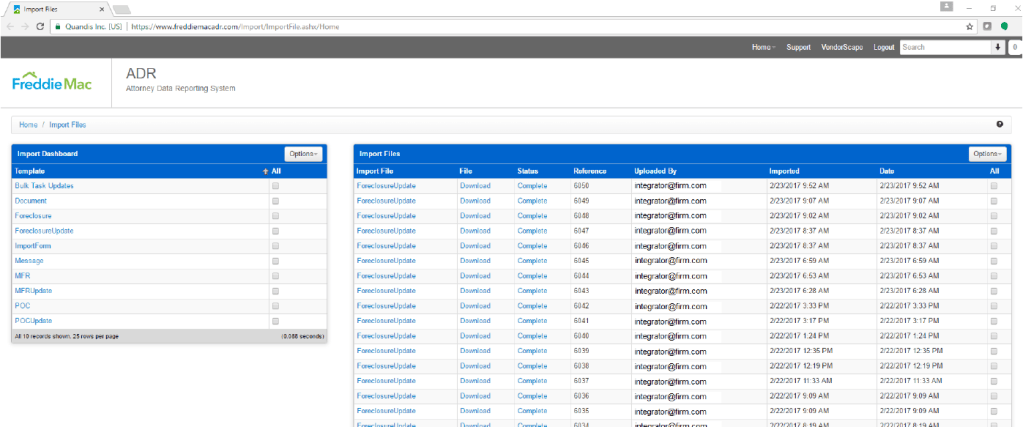
The result pane columns can be sorted ascending or descending by clicking on the column header. The options drop down to the right allows for quick filtering:
The upper right hand contains a text box with the label “Search”. This is the smart search box. This is the fastest way to conduct a search for an import. Possible submission values:
By clicking on the down arrow on the right hand side of the Smart Search text box, you will expose a modal labeled “Search Imports”.
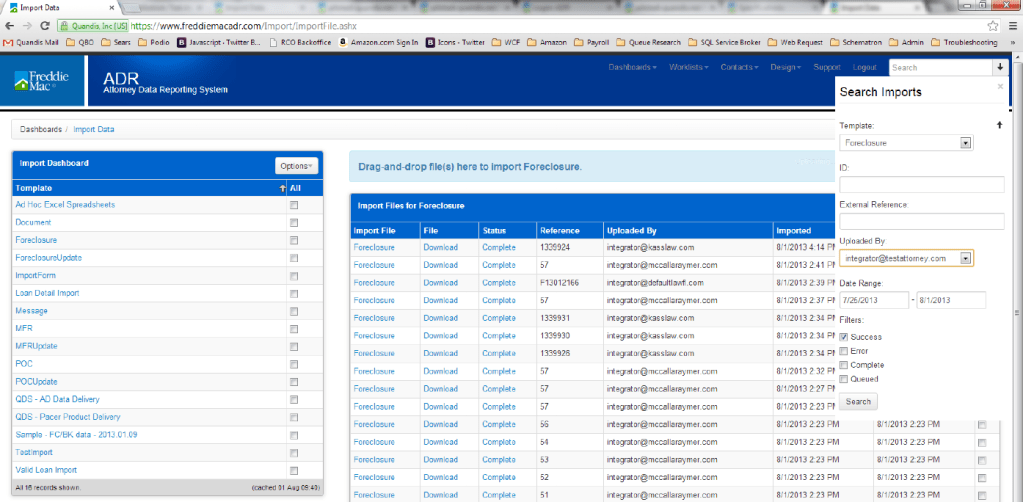
This modal allows additional search filtering. The search filters include:
From the results pane a user can click on the following links per item:
Import File Summary
This is the summary view that allows individual viewing of an import. This view will provide the same information as the search result pane along with additional information.
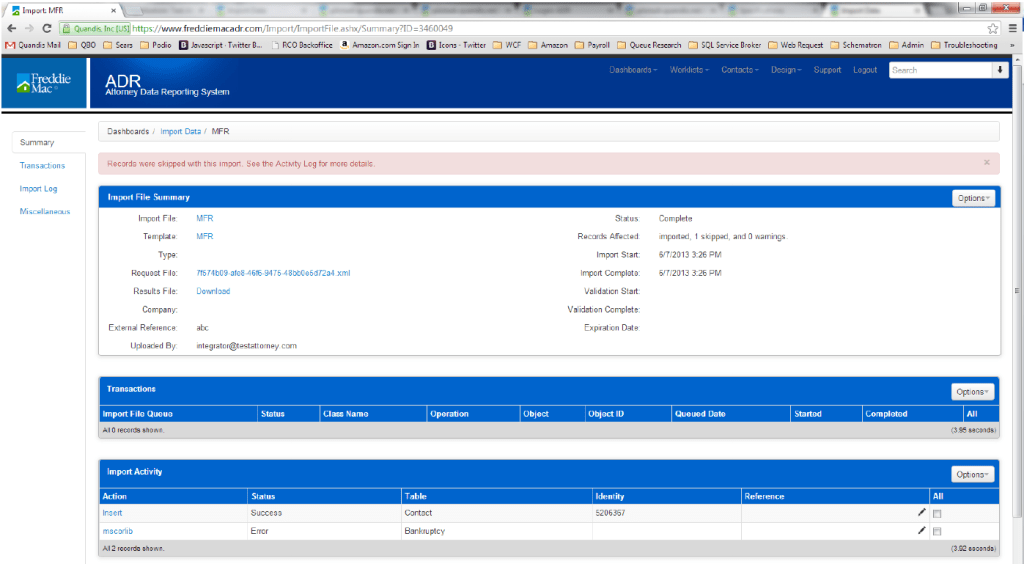
The Import File Summary is broken up into 3 sections:
The following is a list of the available attachment templates, along with the parent object, name and repeatability.
| Parent | Attachment Name | Repeatability |
| Foreclosure | Act Letters | One per parent |
| Foreclosure | Affidavit | One per parent |
| Foreclosure | Application | One per parent |
| Foreclosure | Appraisal | One per parent |
| Foreclosure | ARM Rider | One per parent |
| Foreclosure | Assignment | One per parent |
| Foreclosure | Assignment (unrecorded) | One per parent |
| Foreclosure | Bankruptcy Plan | One per parent |
| Foreclosure | Bid Form | Many per parent |
| Foreclosure | BPO | One per parent |
| Foreclosure | Breach Letter | One per parent |
| Foreclosure | Certificate of Attachment | One per parent |
| Foreclosure | Certificate of Title (mh) | One per parent |
| Foreclosure | Certificate of Sale (mh) | One per parent |
| Foreclosure | Charge Off Form | One per parent |
| Foreclosure | Condo Rider | One per parent |
| Foreclosure | Consent Orders | One per parent |
| Foreclosure | Contract for Deed | One per parent |
| Foreclosure | Copy of Assignment of Lease | One per parent |
| Foreclosure | Copy of Proprietary Lease | One per parent |
| Foreclosure | Copy of Stock Certificate | One per parent |
| Foreclosure | Copy of Stock Power | One per parent |
| Foreclosure | Copy of UCC-1 | One per parent |
| Foreclosure | Credit Bureau | One per parent |
| Foreclosure | Credit Life Insurance | One per parent |
| Foreclosure | Credit Report | One per parent |
| Foreclosure | Current Title Commitment | One per parent |
| Foreclosure | Customer Correspondence | One per parent |
| Foreclosure | Deed of Trust | One per parent |
| Foreclosure | Demand Letter | One per parent |
| Foreclosure | Default Payoffs | One per parent |
| Foreclosure | Derogatory Credit Explanation | One per parent |
| Foreclosure | Disclosure of Loan Terms | One per parent |
| Foreclosure | DIL Authorization | One per parent |
| Foreclosure | Environmental Hazards | One per parent |
| Foreclosure | EPA Correspondence | One per parent |
| Foreclosure | Extension Agreement | One per parent |
| Foreclosure | FC Final Deed | One per parent |
| Foreclosure | FHA Eviction Package | One per parent |
| Foreclosure | FHA Post Sale Package | One per parent |
| Foreclosure | FHA Title Package | One per parent |
| Foreclosure | Flood Insurance Certification | One per parent |
| Foreclosure | Forbearance Agreement | One per parent |
| Foreclosure | Foreclosure complaints | One per parent |
| Foreclosure | Foreclosure Judgments | One per parent |
| Foreclosure | Foreclosure/Sheriff’s Deed | One per parent |
| Foreclosure | Good Faith Estimate | One per parent |
| Foreclosure | Hardship Letter | One per parent |
| Foreclosure | HAMP Letter | One per parent |
| Foreclosure | Home Equity Order | One per parent |
| Foreclosure | HUD | One per parent |
| Foreclosure | HUD-1 | One per parent |
| Foreclosure | Loan Application | One per parent |
| Foreclosure | Loan Approval | One per parent |
| Foreclosure | Lost Assignment Affidavit | One per parent |
| Foreclosure | Lost Note Affidavit | One per parent |
| Foreclosure | Mechanic’s Lien Affidavit | One per parent |
| Foreclosure | Misc Rider | One per parent |
| Foreclosure | Mobile-Home Title | One per parent |
| Foreclosure | Modification | One per parent |
| Foreclosure | Mortgage | One per parent |
| Foreclosure | Mortgage Insuring Certificate | One per parent |
| Foreclosure | Mortgage Rider | One per parent |
| Foreclosure | Motion for Relief Order | One per parent |
| Foreclosure | Name Affidavit | One per parent |
| Foreclosure | Non Sufficient Fund | One per parent |
| Foreclosure | Note | One per parent |
| Foreclosure | Note Rider | One per parent |
| Foreclosure | Notice of BK Filing | One per parent |
| Foreclosure | Notice of Default Complaint | One per parent |
| Foreclosure | Notice of Sale | One per parent |
| Foreclosure | Other | One per parent |
| Foreclosure | Payment History | One per parent |
| Foreclosure | Payoff Statements | One per parent |
| Foreclosure | Power of Attorney | One per parent |
| Foreclosure | Property Inspection | One per parent |
| Foreclosure | Property Insurance Policy | One per parent |
| Foreclosure | PUD Rider | One per parent |
| Foreclosure | Purchase Sales Contract | One per parent |
| Foreclosure | Reaffirmation | One per parent |
| Foreclosure | Recorded Security Instrument | One per parent |
| Foreclosure | Rehabilitation Loan Rider | One per parent |
| Foreclosure | Release of Lien | One per parent |
| Foreclosure | Release/Dismissal of Tax Suit | One per parent |
| Foreclosure | Returned POCs | One per parent |
| Foreclosure | Right to Cancel | One per parent |
| Foreclosure | Security Deed | One per parent |
| Foreclosure | Sheriff’s Sale Notice | One per parent |
| Foreclosure | Sheriff’s Deed | One per parent |
| Foreclosure | Stipulated Plan | One per parent |
| Foreclosure | Substitute Trustee’s Deed | One per parent |
| Foreclosure | Substitution of Trustee | One per parent |
| Foreclosure | Summary Sheet | One per parent |
| Foreclosure | Summon & Complaint Docs | One per parent |
| Foreclosure | Survey | One per parent |
| Foreclosure | Title Commitment | One per parent |
| Foreclosure | Title Indemnity | One per parent |
| Foreclosure | Title Policy | One per parent |
| Foreclosure | Title Search | One per parent |
| Foreclosure | Transfer of Service Disclosure | One per parent |
| Foreclosure | Truth in Lending | One per parent |
| Foreclosure | Underwriter Approval Letter | One per parent |
| Foreclosure | Unrecorded Mortgage | One per parent |
| Foreclosure | Warranty Deed | One per parent |
| Foreclosure | Reinstatement Quote | Many per parent |
| Foreclosure | Payoff Quote | Many per parent |
| Report | Crystal Report1 | One per parent |
| Report | Excel Report1 | One per parent |
| ImportFile | Bulk Import | Many per parent |
| Report | Timeline Summary | Many per parent |
| Report | Hold | Many per parent |
| Report | Timeline Completion | Many per parent |
| Report | Timeline Exception | Many per parent |
| Report | Litigation Detail | Many per parent |
| Organization | LMWS Attorney Firm File | Many per parent |
| Organization | LMWS Foreclosure | Many per parent |
| Organization | LMWS Bankruptcy MFR | Many per parent |
| Organization | LMWS Backruptcy POC | Many per parent |
| Foreclosure | MultipleTest | Many per parent |
| Foreclosure | Deficiency Judgment | One open per parent |
| Bankruptcy | BK Document | Many per parent |
| Foreclosure | FC Document | Many per parent |
| Attachment | LDI Response File | One per parent |
| Foreclosure | FC Bidding Instructions | One per parent |
| Foreclosure | Certificate of Purchase | One per parent |
| Foreclosure | Notice of Intent Seek Def | One per parent |
| Foreclosure | Affidavit of Indebtedness | One per parent |
| Foreclosure | Order Approving FC Sale | One per parent |
| Foreclosure | Affidavit of Service | Many per parent |
| Foreclosure | Assignment of Judgement | One per parent |
| Contact | Spec Test – hli54ks5 | Many per parent |
| Report | Settlement | Many per parent |
| Report | Foreclosure Document Deficiency | Many per parent |
| Report | SFDML Litigation | Many per parent |
| Report | Inventory | Many per parent |
| Report | Summary Level | Many per parent |
| MessageTemplate | Blast Email Attachments | Many per parent |
| Report | Postponement | Many per parent |
| Foreclosure | Upload Test | Many per parent |
| Report | Attorney Data Management | Many per parent |
| Report | Litigation Hold Reconciliation | Many per parent |